
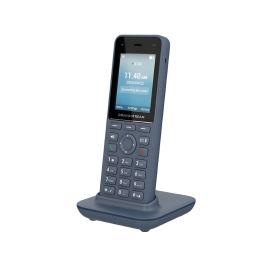
Digital VoIP Phone Systems: A Practical Guide for Businesses
A digital VoIP phone system lets businesses make and receive calls over an internet connection rather than relying solely on traditional telephone lines. VoIP stands for Voice over Internet Protocol: it converts speech into digital data and sends it across a network.
From small businesses to larger organisations with multiple sites, VoIP can offer a flexible way to manage calls. This guide explains how the technology works, what features to look for and how to prepare for a switch.
How does a digital VoIP phone system work?
With a VoIP system, a call travels over a broadband connection or private data network. Users can make calls using desk phones designed for VoIP, computer software or mobile apps. Depending on the system, calls can also be routed to existing phone numbers and devices.
Many VoIP services are hosted in the cloud. In this arrangement, the provider manages the phone system’s central equipment, while the business accesses its features through the internet. Other organisations choose an on-site system, where some of the equipment is installed and maintained at their premises.
Potential benefits of VoIP
- Flexible working: Staff may be able to take calls through a desk phone, computer or mobile app, depending on the service.
- Support for multiple locations: Calls can be managed across offices, remote workers and other sites through one system.
- Scalability: It may be possible to add or remove users as business requirements change.
- Useful call-handling tools: Features such as call forwarding, voicemail, call queues and auto-attendants can help organise incoming calls.
- Integration options: Some systems can connect with customer relationship management (CRM) software and other business applications.
- Potential cost efficiencies: Depending on call volumes, existing equipment and the chosen service, VoIP may help reduce certain telephony costs. It is worth comparing the full costs rather than looking at call rates alone.
Features to consider
The right features depend on how your organisation communicates with customers and colleagues. Common options include:
- Auto-attendant: Directs callers to the right team or person through a menu.
- Call queues: Places callers in a queue when staff are busy and routes calls as team members become available.
- Call forwarding: Sends calls to another number or device when a user is unavailable.
- Voicemail and voicemail-to-email: Stores messages and, where supported, sends notifications or recordings to an email account.
- Call reporting: Provides information about call volumes, waiting times and other activity.
- Video and messaging: Some platforms bring voice, video meetings and team messaging together in one service.
Before choosing a package, check which features are included, which cost extra and whether they can be configured to suit your workflows.
What do you need for a reliable VoIP service?
Call quality depends on more than the phone system itself. A stable, suitably fast internet connection is important, particularly when several people make calls at the same time. Your provider or IT team can help assess bandwidth requirements and network readiness.
It is also sensible to check the network’s capacity, Wi-Fi coverage and router or firewall settings. For consistently clear calls, some businesses use wired connections for desk phones or configure their network to prioritise voice traffic. A backup internet connection or call-diversion plan may help maintain contact during an outage.
Security and resilience
VoIP is a business communication service, so it should be protected like any other important system. Ask potential providers how they secure calls and account access, manage updates and monitor for suspicious activity. Use strong, unique passwords and multi-factor authentication where available, and give staff only the access they need.
Consider what happens if the internet or power fails. Options may include diverting calls to mobile phones, using a secondary connection or following a documented continuity plan. Check the provider’s support arrangements and service commitments before signing up.
How to plan a move to VoIP
- Review your current setup: Record your phone numbers, users, call flows, equipment and any services connected to your existing lines.
- Identify your requirements: Consider how many people need the system, where they work and which features are essential.
- Check your network: Assess internet reliability and capacity, and identify any upgrades needed before moving calls.
- Compare providers: Look at pricing, contract terms, support, number porting, security and service availability.
- Plan the transition: Arrange any required number transfers, configure call routing and test the system before relying on it.
- Train users: Provide clear guidance on using the phones, apps, voicemail and call-handling features.
Choosing a digital VoIP phone system
A suitable VoIP system should match your organisation’s size, working practices and budget. Compare the total cost, including subscriptions, handsets, setup, support and any network improvements. Check that the system can grow with your business and that the provider offers help when you need it.
With careful planning, a digital VoIP phone system can make business calling more flexible and easier to manage. Start by reviewing how your team handles calls today, then compare solutions against your practical needs—not just a list of features.
Understanding Digital VoIP Phone Systems: Top 8 Frequently Asked Questions
- Can I just plug a VoIP phone into my router?
- What is the difference between analog digital and VoIP phones?
- What is a digital VoIP phone?
- Can I just plug in a VoIP phone?
- What are the 2 types of VoIP?
- Do I need to buy a special phone for VoIP?
- What is the difference between VoIP and digital phone system?
- Can any phone be used as a VoIP phone?
Can I just plug a VoIP phone into my router?
In many cases, yes: you can connect a compatible VoIP desk phone to an available Ethernet port on your router and follow the setup instructions from your provider. However, the phone will usually need a VoIP service and account details to make and receive calls, and some systems require specific settings or equipment. Check that your internet connection and router can support clear, reliable calls, and ask your provider whether the phone is compatible before plugging it in.
What is the difference between analog digital and VoIP phones?
Analogue phones carry voice as electrical signals over traditional telephone lines, while digital phones convert voice into digital signals and typically connect to a business phone system, such as a PBX. VoIP phones also digitise voice, but send it as data over an internet connection or other IP network. In short, a digital phone is not necessarily a VoIP phone: the key difference is that VoIP uses an IP network to make and receive calls.
What is a digital VoIP phone?
A digital VoIP phone is a telephone that makes and receives calls over an internet connection rather than a traditional phone line. It converts your voice into digital data and sends it across the network, allowing you to call from a compatible desk phone, computer or mobile app. Depending on the service, it may also offer features such as call forwarding, voicemail and video calling.
Can I just plug in a VoIP phone?
In many cases, you can plug a VoIP phone into a suitable router or network port, but it will only work once it has been configured with a VoIP service. You may need account details from your provider, and your network must have a reliable internet connection and support the phone’s requirements. Check compatibility with your provider before buying or connecting a handset, particularly if your system uses specific settings or equipment.
What are the 2 types of VoIP?
The two common types of VoIP are hardware-based and software-based. Hardware-based VoIP uses dedicated internet phones or adapters connected to a network, while software-based VoIP uses an app on a computer, tablet or smartphone with a headset or the device’s microphone and speakers. Both make calls over the internet; the best option depends on how and where your team works.
Do I need to buy a special phone for VoIP?
You don’t always need to buy a special phone to use VoIP. Many systems work with a compatible desk phone, a computer or a mobile app, so you may be able to use devices you already own. If you prefer a desk phone, choose a VoIP-compatible model and check that it works with your provider’s service; some traditional phones can also be used with an adapter.
What is the difference between VoIP and digital phone system?
VoIP is a type of digital phone system that carries calls over an internet connection. The term “digital phone system” is broader and may also refer to systems that use other digital networks or equipment, such as a traditional business phone system. In everyday use, the terms are sometimes used interchangeably, so check how a provider’s system connects calls and what equipment or internet connection it requires.
Can any phone be used as a VoIP phone?
Not every phone can connect directly to a VoIP service. You can use a compatible IP desk phone, a computer or smartphone with a VoIP app, or an existing traditional phone connected through an analogue telephone adapter (ATA). Check that the device is compatible with your provider’s service before setting it up.
Tags: auto-attendant, business communications, business continuity, business phone system, call forwarding, call handling, call quality, call queues, call reporting, cloud voip, crm integration, digital voip phone system, flexible working, hosted phone system, internet calling, internet connection, multi-factor authentication, multi-location support, network readiness, number porting, on-site phone system, provider comparison, scalability, team messaging, total cost of ownership, video meetings, voice over internet protocol, voicemail, voip security, voip transition