
Business IP PBX: A Practical Guide for Modern Businesses
Reliable communication is essential for serving customers and keeping teams connected. A business IP PBX can help organisations manage calls more efficiently by using internet protocol (IP) technology to route voice calls across a business phone system.
What is an IP PBX?
PBX stands for Private Branch Exchange. It is a business telephone system that lets employees call one another internally and make or receive external calls using shared lines or services. An IP PBX performs these functions using an internet connection or private data network, rather than relying solely on traditional telephone lines.
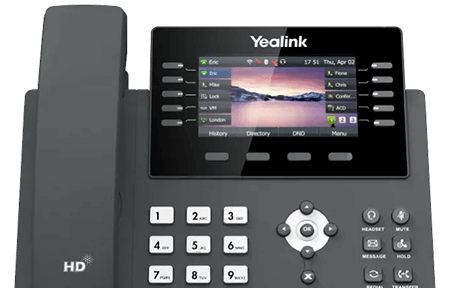
Depending on the setup, an IP PBX may be hosted on the organisation’s premises, provided as a cloud service, or delivered through a hybrid arrangement. Staff can use desk phones, computer applications or compatible mobile devices to make and receive calls.
How does a business IP PBX work?
An IP PBX manages call routing between users, departments and external callers. When someone makes a call, the system directs it to the right destination. It can also provide features such as call queues, voicemail and automated menus.
Voice is transmitted as data over an IP network. Calls to and from the public telephone network are typically handled through a service provider, such as a SIP trunk provider. The precise configuration depends on the system and the business’s requirements.
Potential benefits of an IP PBX
- Flexible working: Staff may be able to use their business number from different locations, subject to the system and network setup.
- Centralised call management: Calls can be directed to individuals, teams or queues using consistent rules.
- Useful business features: Common options include voicemail, call forwarding, hunt groups, auto-attendants and conference calling.
- Room to grow: Users and extensions can often be added or changed as the organisation’s needs evolve.
- Integration opportunities: Some systems can connect with customer relationship management (CRM) software and other business tools.
- Greater visibility: Reporting features can help managers understand call volumes and service performance, where available.
Actual costs and benefits vary. They depend on factors such as the number of users, the chosen service, call plans, hardware, support and the quality of the network.
On-premises, hosted or hybrid?
On-premises IP PBX: The business owns or manages equipment at its premises. This can offer greater control, but it also means planning for maintenance, security, upgrades and resilience.
Hosted IP PBX: The provider runs the phone system in a data centre or cloud environment. This can reduce the need to maintain system hardware on site, although the business remains reliant on its internet connection and should check the provider’s service levels and support arrangements.
Hybrid IP PBX: A combination of hosted and on-site components may suit organisations with specific technical, operational or resilience requirements.
What to consider before choosing a system
Start by reviewing how your business handles calls today and what you would like to improve. Consider the number of users, office locations, remote-working needs, call volumes and any specialist requirements, such as contact-centre functions or integration with existing software.
- Network readiness: Voice calls need a dependable network. Assess internet capacity, internal network equipment and call quality before deployment.
- Resilience: Ask what happens if the internet connection, power or provider service is unavailable. Options may include call diversion, backup connectivity or alternative working arrangements.
- Security: Review access controls, software updates, account security and protection against unauthorised use. Agree who is responsible for each part of the system.
- Compatibility: Check that phones, headsets, applications and business software work with the proposed solution.
- Support and service levels: Understand support hours, fault-reporting processes, maintenance responsibilities and any service commitments.
- Total cost: Compare setup charges, subscriptions, call costs, equipment, licences, support and potential upgrade costs.
- Number portability: If you plan to keep existing numbers, confirm the transfer process and timings with the provider before making changes.
Is an IP PBX right for your business?
An IP PBX may be a good option for businesses looking to manage calls across multiple users or locations, support flexible working, or introduce more structured call handling. It is not a one-size-fits-all solution: the right choice depends on the organisation’s budget, network, working practices and plans for growth.
Before committing, document your requirements, check your network and compare providers on features, support, security and overall cost. A well-planned business IP PBX can make everyday communications easier to manage and provide a flexible foundation for future needs.
Business IP PBX: 9 Frequently Asked Questions
- What is a business IP PBX?
- How does an IP PBX phone system work?
- What are the benefits of an IP PBX for a business?
- What is the difference between an on-premises and hosted IP PBX?
- How much does a business IP PBX cost?
- What equipment and internet connection are needed for an IP PBX?
- Can employees use an IP PBX when working remotely?
- Can a business keep its existing phone numbers when switching to an IP PBX?
- How secure and reliable is a business IP PBX?
What is a business IP PBX?
A business IP PBX is a phone system that manages calls between employees and to or from external numbers using an internet protocol (IP) network. It can connect desk phones, computers and compatible mobile devices, while providing features such as call routing, voicemail, call queues and automated menus. An IP PBX may be hosted in the cloud or run on equipment at your premises.
How does an IP PBX phone system work?
An IP PBX phone system uses your internet connection or business network to handle calls. When someone makes or receives a call, the system routes it to the right extension, person or department, using desk phones, computers or compatible mobile devices. Calls to and from external phone numbers are typically connected through a service such as a SIP trunk. The system can also manage features such as call transfers, voicemail, call queues and automated menus.
What are the benefits of an IP PBX for a business?
An IP PBX helps businesses manage calls over an internet connection, with features such as call forwarding, voicemail, call queues and automated menus. It can make it easier for teams to stay connected across different locations, support remote working and simplify call handling as a business grows. Depending on the provider and setup, it may also integrate with tools such as CRM software. The overall benefits and costs depend on your requirements, network quality and chosen service.
What is the difference between an on-premises and hosted IP PBX?
An on-premises IP PBX is installed at your business premises, so your organisation is responsible for maintaining the equipment, updates and security, but can have more direct control over the system. A hosted IP PBX is run by a provider, with calls and system features delivered over the internet; this usually means less on-site equipment and maintenance, often for a recurring subscription. Both can support features such as call routing and voicemail, but the best option depends on your budget, technical resources, need for control and internet reliability.
How much does a business IP PBX cost?
The cost of a business IP PBX depends on the number of users, the features you need and whether you choose a hosted, on-premises or hybrid system. Hosted solutions typically charge a monthly fee per user, while on-premises systems may involve upfront costs for hardware, installation and ongoing maintenance. Call charges, handsets, licences, support and network upgrades can also affect the total. Request a detailed quote and compare the full costs over time, not just the initial price.
What equipment and internet connection are needed for an IP PBX?
An IP PBX typically needs compatible desk phones or softphone apps, a reliable router and firewall, and—if using desk phones—a suitable network switch, often with Power over Ethernet (PoE). You’ll also need a stable internet connection with enough capacity for the number of simultaneous calls, as well as low latency, jitter and packet loss; prioritising voice traffic through Quality of Service (QoS) settings can help. Your provider can advise on bandwidth and any requirements such as a static IP address, SIP service or backup connection, as these depend on the system and configuration.
Can employees use an IP PBX when working remotely?
Yes, employees can often use a business IP PBX remotely through a compatible desk phone, computer app or mobile app, depending on the system. This can allow them to make and receive calls using their business number while away from the office. A reliable internet connection is important, and the system should be configured with appropriate security measures. Check with your provider to confirm which devices and remote-working features are supported.
Can a business keep its existing phone numbers when switching to an IP PBX?
Yes, in most cases a business can keep its existing phone numbers when switching to an IP PBX by arranging a number port with its current and new providers. The process and timescales can vary, so check that your numbers are eligible and confirm the details before making the change. Keep your existing service active until the transfer is complete to help avoid disruption.
How secure and reliable is a business IP PBX?
A business IP PBX can be secure and reliable when it is properly configured, maintained and supported. Security measures may include strong passwords, access controls, encryption, software updates, firewalls and protection against call fraud; ask your provider which are included and who manages them. Reliability also depends on your internet connection and network, so consider backup connectivity, power protection, call-diversion options and clear service-level commitments to help keep calls running during an outage.
Tags: auto-attendant, business communications, business ip pbx, business phone system, call forwarding, call management, call queues, call routing, cloud phone system, conference calling, crm integration, flexible working, hosted ip pbx, hybrid ip pbx, internet protocol telephony, ip pbx, network readiness, network resilience, number portability, on-premises ip pbx, phone system security, private branch exchange, provider support, sip trunk provider, total cost of ownership, voicemail