
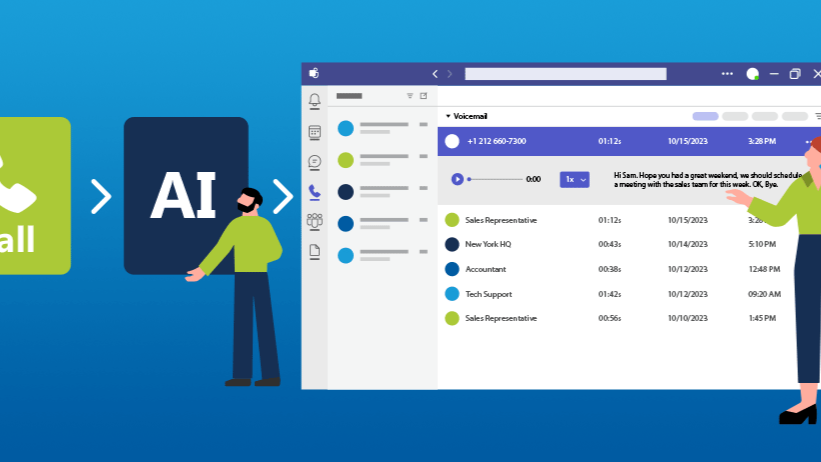
UCaaS and Microsoft Teams: Bringing Business Communications Together
Businesses increasingly need more than a telephone system. Staff may work from the office, at home or on the move, while customers expect prompt, reliable communication across different channels. Unified Communications as a Service (UCaaS) brings tools such as calling, video meetings, messaging and collaboration together in the cloud. For many organisations, Microsoft Teams is a familiar platform at the centre of that approach.
What is UCaaS?
UCaaS is a cloud-based model for delivering business communications. Instead of relying on separate, on-site systems for telephony, conferencing and messaging, a business can access these services through a hosted platform. The provider manages much of the underlying infrastructure, while users connect through internet-enabled devices.
A UCaaS solution may include:
- Business voice calling
- Video and audio meetings
- Instant messaging and presence information
- Voicemail and call routing
- Integration with business applications
Where Microsoft Teams fits in
Microsoft Teams is a collaboration platform that supports chat, meetings, file sharing and teamwork. With the right licensing and telephony setup, it can also be used to make and receive external business calls. This is commonly achieved using Microsoft Teams Phone, alongside a suitable connection to the public telephone network.
Organisations can connect Teams calling in different ways. Options may include Microsoft Calling Plans, Operator Connect or Direct Routing. Availability and suitability depend on factors such as location, existing contracts, call requirements and the organisation’s Microsoft 365 setup.
Potential benefits for businesses
A familiar place to work and communicate
When employees already use Teams for meetings and collaboration, adding business calling can bring more communications into a single application. Staff can chat with colleagues, join meetings and handle calls without switching constantly between tools.
Support for hybrid working
Because Teams is cloud-based, users can access many of its functions from compatible computers and mobile devices, wherever they are working. This can help businesses provide a consistent experience across office-based and remote teams, subject to a reliable internet connection and appropriate configuration.
Flexible call handling
Teams telephony can be configured with features such as call queues, auto attendants, voicemail and call forwarding. These features can help route enquiries to the right people and make it easier to manage calls when teams are busy or working across different locations.
Integration with Microsoft 365
Teams is part of the wider Microsoft 365 environment. Depending on the configuration, businesses may be able to connect communications with calendars, contacts and other Microsoft services. This can make day-to-day tasks more convenient and reduce the need to move between separate systems.
What to consider before moving your phone system
Microsoft Teams can be a strong option for business communications, but it is important to plan the telephony element carefully. Consider the following before making a decision:
- Licensing: Check which Microsoft licences and Teams Phone features your organisation needs.
- Call requirements: Review call volumes, international calling, numbers, call queues and any specialist features.
- Connectivity: Voice and video quality depend on a suitable network. Assess internet capacity, Wi-Fi coverage and network configuration.
- Number management: Plan how existing telephone numbers will be transferred or connected.
- Resilience: Consider what should happen if a user’s internet connection or primary service is unavailable.
- Emergency calling: Make sure emergency-call arrangements are appropriate for users’ locations and comply with applicable requirements.
- Training and support: Help employees understand how to use the system and where to get assistance.
Is Microsoft Teams a UCaaS solution?
Teams provides many unified communications capabilities, but a complete business telephony service may involve additional licences, a telephone network connection, configuration and support. In practice, a Teams-based UCaaS solution combines the Teams application with the components needed to deliver and manage business calling.
The right setup depends on how an organisation works. A small team with straightforward calling needs may require a different design from a multi-site business with contact-centre functions, complex call routing or strict resilience requirements.
Choosing the right approach
Before selecting a solution, map out how employees communicate today and what they need to do in the future. Compare the available calling options, check compatibility with existing systems and assess the quality of your network. A provider or experienced IT partner can help with design, number porting, deployment and ongoing support.
When properly planned, a UCaaS solution built around Microsoft Teams can bring calling, meetings and collaboration closer together. The result can be a more joined-up communications experience for employees and customers alike.
7 Key Benefits of Microsoft Teams UCaaS
- Brings calls, meetings and messaging together.
- Supports hybrid and remote working.
- Provides familiar tools for Microsoft 365 users.
- Enables flexible call routing and voicemail.
- Works across compatible desktop and mobile devices.
- Can reduce reliance on separate communication systems.
- Scales to suit changing business needs.
Microsoft Teams UCaaS: Connectivity, Cost and Deployment Challenges
- Call quality depends on a reliable internet connection.
- Extra licences or telephony services may increase costs.
- Setup and number porting can take careful planning.
Brings calls, meetings and messaging together.
One of the key benefits of UCaaS with Microsoft Teams is that it brings calls, meetings and messaging together in one familiar platform. Staff can switch easily between a phone call, video meeting and chat, helping conversations stay connected and reducing the need to juggle multiple apps. This can make everyday communication simpler, particularly for teams working across different locations.
Supports hybrid and remote working.
Supports hybrid and remote working
UCaaS with Microsoft Teams helps employees stay connected whether they are working in the office, at home or on the move. With calling, messaging and meetings available through a familiar app on compatible devices, staff can collaborate and handle business calls without being tied to a desk. This makes it easier for teams to work flexibly while maintaining a consistent communications experience across locations.
Provides familiar tools for Microsoft 365 users.
For organisations already using Microsoft 365, UCaaS with Microsoft Teams can feel familiar from day one. Staff can make calls, join meetings and message colleagues in the Teams environment they may already use for everyday work, helping reduce the learning curve and making it easier to bring communication together in one place.
Enables flexible call routing and voicemail.
Microsoft Teams with UCaaS makes it easier to manage calls as your business changes. Calls can be routed to the right person or team using options such as call queues, auto attendants and forwarding rules, helping customers reach the support they need. Voicemail gives staff a convenient way to catch up on missed calls, whether they’re in the office, working remotely or on the move.
Works across compatible desktop and mobile devices.
With a UCaaS solution built around Microsoft Teams, employees can communicate using compatible desktop and mobile devices. They can make and receive calls, join meetings and stay in touch with colleagues whether they are at their desk, working remotely or on the move. This flexibility helps teams stay connected across different locations, provided they have a suitable device and a reliable internet connection.
Can reduce reliance on separate communication systems.
By bringing calling, video meetings, messaging and collaboration together in Microsoft Teams, a UCaaS solution can reduce reliance on separate communication systems. Staff can handle more of their day-to-day communication in one familiar workspace, with fewer applications to switch between. This can simplify processes and make communication easier to manage, although the exact benefits depend on how the service is configured and the tools your organisation already uses.
Scales to suit changing business needs.
Scales to suit changing business needs
A UCaaS solution built around Microsoft Teams can adapt as your organisation grows or changes. You can add or remove users, adjust calling features and support new teams or locations without investing in extensive on-site phone equipment. This flexibility makes it easier to respond to changing workloads, business priorities and ways of working, while keeping communication tools aligned with your needs.
Call quality depends on a reliable internet connection.
One potential drawback of using Microsoft Teams as part of a UCaaS solution is that call quality depends on a reliable internet connection. Slow speeds, network congestion or unstable Wi-Fi can lead to delays, drop-outs and poor audio, disrupting conversations with colleagues and customers. Businesses should check their network capacity and coverage before moving calls to Teams, and consider backup connectivity for essential communications.
Extra licences or telephony services may increase costs.
One potential drawback of using Microsoft Teams as part of a UCaaS solution is the additional cost of licences and telephony services. Teams calling may require extra Microsoft licences, a connection to the public telephone network, or services from a third-party provider. These costs can add up, particularly for larger organisations or those with complex calling needs, so it is worth checking the full pricing and feature requirements before making the switch.
Setup and number porting can take careful planning.
Setting up UCaaS with Microsoft Teams can take careful planning, particularly when transferring existing phone numbers. Businesses need to coordinate number porting with their provider, check that licences and calling options are configured correctly, and ensure the network is ready for reliable voice calls. Without thorough preparation, the transition may take longer than expected or disrupt day-to-day communications, so it is important to agree a clear migration plan and timetable in advance.
Tags: auto attendants, business calling, business communications, business voice calling, call forwarding, call queues, call routing, calling plans, cloud-based communications, collaboration, customer communication, direct routing, emergency calling, hosted platform, hybrid working, instant messaging, it support, licensing, microsoft 365, microsoft teams, network connectivity, number porting, operator connect, resilience, teams phone, telephony, ucaas, ucaas microsoft teams, unified communications, video meetings, voicemail