
Home VoIP Server: A Practical Guide
A home VoIP server can bring several phones, handsets and communication apps together in one manageable system. Whether you want an extension in each room, a dedicated home-office phone or a way to connect traditional telephone handsets, a VoIP server can offer more flexibility than a single internet phone line.
Before getting started, it helps to understand what a home VoIP server does, what equipment you need and how to keep the system secure and reliable.
What is a home VoIP server?
VoIP, or Voice over Internet Protocol, carries phone calls over an internet connection rather than a traditional telephone line. A VoIP server is usually a private branch exchange (PBX): software that manages calls between your devices and, if configured, connects them to an external telephone service.
For example, a PBX could let you call between a desk phone in your study and a cordless handset in the kitchen using internal extensions. To make or receive calls to ordinary telephone numbers, you will generally also need an account with a VoIP provider. The server manages the calls; the provider supplies the connection to the public telephone network.
Why set one up at home?
- Multiple extensions: Give different rooms or household members their own extensions.
- Call routing: Choose which devices ring, and when. You could, for instance, send unanswered calls to voicemail.
- Useful features: Depending on the software and provider, features may include call transfer, voicemail, call queues and contact directories.
- Choice of devices: Use compatible IP phones, softphone apps on computers and mobiles, or traditional handsets connected through an analogue telephone adaptor (ATA).
- More control: A self-hosted PBX gives you greater control over settings and how your internal system works.
A home server is not automatically cheaper or easier than a hosted VoIP service. It may involve more setup and maintenance, so it is worth considering whether you need the extra control.
What equipment and software do you need?
A basic home VoIP setup usually needs the following:
- A server or suitable computer: This could be a small dedicated computer, a virtual machine or another reliable device that can run PBX software.
- PBX software: Options include Asterisk-based systems and other VoIP platforms. Check the current licensing, hardware requirements and support arrangements before choosing.
- VoIP devices: These may be IP desk phones, softphone apps or ATAs for compatible analogue phones.
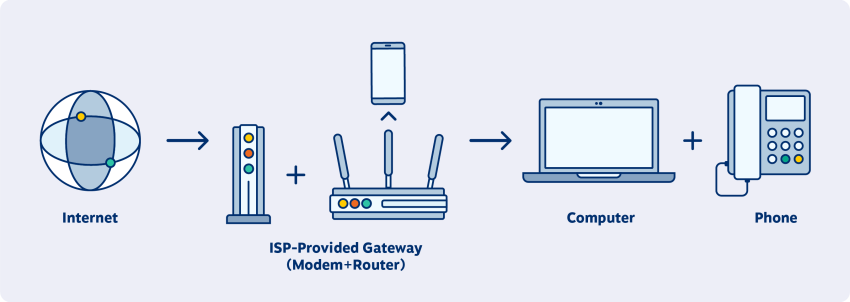
- A network connection: A stable router and local network are important. Ethernet connections are often preferable for fixed phones and the server.
- A VoIP provider: If you want to call regular UK or international numbers, you will generally need a provider that offers the relevant service and telephone numbers.
How to plan your setup
- Decide what you need. List the people and devices that need extensions, and decide whether you need inbound and outbound calls, voicemail or other features.
- Choose between self-hosted and hosted VoIP. A self-hosted PBX offers more hands-on control. A hosted service may be simpler because the provider looks after the server.
- Check compatibility. Confirm that your phones, software and chosen provider support the same protocols and features.
- Set up extensions and call routing. Create separate accounts for each device and decide how calls should be directed.
- Test thoroughly. Check internal calls, incoming and outgoing calls, voicemail and call quality before relying on the system.
Security matters
A VoIP server connected to the internet needs careful security. Poorly protected systems can be targeted for unauthorised calls or other misuse. Use unique, strong passwords for every extension and administration account, keep the server and software updated, and disable services and accounts you do not need.
Avoid exposing the PBX administration interface directly to the internet. Where possible, use a virtual private network (VPN) for remote access, and configure firewall rules to allow only the traffic your system requires. If you are unsure how to secure the network or PBX, seek help from someone with VoIP and networking experience.
Reliability and emergency calling
VoIP depends on electricity, your internet connection and the service provider. If any of these are unavailable, calls may not work. Consider a backup power supply for essential equipment and keep another way to contact emergency services available.
Do not assume that emergency calling works in the same way as it does on a traditional phone line. Check with your VoIP provider how calls to 999 and 112 are handled, whether your location details need to be registered and what happens during a power or broadband outage. Keep your registered location up to date if the service requires it.
Is a home VoIP server right for you?
A home VoIP server can be a good choice if you enjoy managing technology or need several extensions and customised call handling. If you simply want one or two phones with minimal maintenance, a hosted VoIP service may be a more straightforward option.
Whichever approach you choose, plan for security, reliable connectivity and emergency access from the outset. A well-configured system can make home communication more flexible, while a sensible backup plan helps ensure you are not left without a way to call when the internet or power goes down.
Essential FAQs for Setting Up and Using a Home VoIP Server
- What is a home VoIP server?
- How does a home VoIP server work?
- What equipment do I need to set up a home VoIP server?
- Which VoIP server software is best for home use?
- Can I use a home VoIP server to make calls to landlines and mobiles?
- How much does it cost to run a home VoIP server?
- How do I secure a home VoIP server?
- Can I make emergency calls using a home VoIP server?
What is a home VoIP server?
A home VoIP server is a system that manages internet-based phone calls across devices in your home. Often called a private branch exchange (PBX), it can connect IP phones, softphone apps and compatible traditional handsets, and lets you set up internal extensions and call routing. To make and receive calls to standard telephone numbers, you will usually also need an account with a VoIP provider.
How does a home VoIP server work?
A home VoIP server manages calls over your internet connection. It connects devices such as IP phones, softphone apps or traditional handsets with an adaptor, and routes calls between them using extensions and rules you configure. To call or receive calls from standard telephone numbers, the server usually connects to a VoIP provider, which links your calls to the wider telephone network. A stable internet connection and properly secured settings help keep the system reliable.
What equipment do I need to set up a home VoIP server?
To set up a home VoIP server, you’ll need a reliable computer or small server to run PBX software, a stable internet connection and a router. You’ll also need compatible VoIP devices, such as IP phones or softphone apps; an analogue telephone adaptor (ATA) can connect traditional handsets. To make and receive calls to standard phone numbers, you’ll usually need an account with a VoIP provider. The exact equipment depends on how many extensions you want and whether you choose to host the system yourself or use a hosted service.
Which VoIP server software is best for home use?
There is no single best VoIP server for every home setup. FreePBX, which uses Asterisk, is a popular choice if you want a graphical interface to manage extensions and call routing, while Asterisk on its own suits people comfortable with configuring a system manually. Compare the options for ease of use, hardware requirements, ongoing support and compatibility with your VoIP provider, and choose software that receives regular security updates.
Can I use a home VoIP server to make calls to landlines and mobiles?
Yes, you can use a home VoIP server to call landlines and mobiles, but you’ll usually need an account with a VoIP provider that connects your system to the public telephone network. The provider may charge for calls or offer a suitable calling plan, so check its rates and coverage before signing up. Your server and internet connection must also be configured correctly, and emergency calling arrangements can differ from those of a traditional landline.
How much does it cost to run a home VoIP server?
The cost of running a home VoIP server depends on your setup and how you use it. You may need to pay for a suitable computer or phone equipment, electricity, and a VoIP provider for telephone numbers and calls; some providers also charge monthly fees. PBX software may be free, but calls to ordinary phone numbers are usually chargeable. Include any costs for backups, updates or technical support when comparing a self-hosted server with a hosted VoIP service.
How do I secure a home VoIP server?
Secure a home VoIP server by keeping its software and firmware up to date, using strong, unique passwords for every account, and disabling unused extensions and services. Configure your firewall to allow only the traffic the system needs, and avoid exposing the administration interface directly to the internet; use a VPN for remote access where possible. Monitor logs and call activity for unusual behaviour, and check your VoIP provider’s guidance on preventing unauthorised or high-cost calls.
Can I make emergency calls using a home VoIP server?
Yes, but only if your VoIP provider and home server are configured to support calls to 999 and 112. Check how the provider handles emergency calls, make sure your registered location is accurate, and confirm whether the service works during a power or broadband outage. Keep a mobile phone or another reliable way to call emergency services available, as a home VoIP server may stop working if your internet connection or power fails.
Tags: analogue telephone adaptor, asterisk, backup power supply, call routing, emergency calling, extensions, firewall, home voip server, hosted voip, internet phone system, ip phones, network reliability, pbx, private branch exchange, self-hosted pbx, softphone apps, voicemail, voip, voip provider, voip security, vpn