
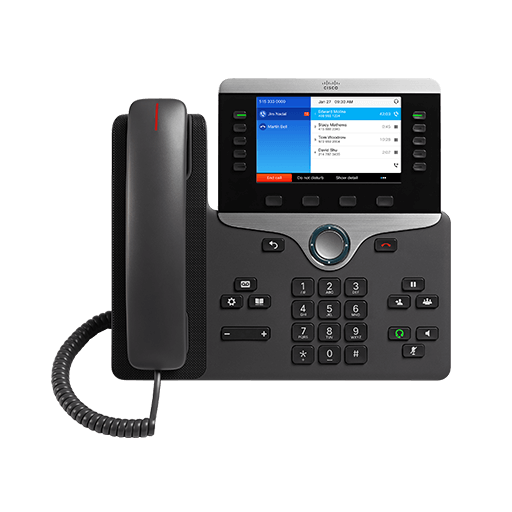
Horizon Cloud Telephony: A Flexible Phone System for Modern Businesses
Horizon is a cloud-based telephony service that gives businesses access to many of the features traditionally provided by an on-site telephone system. Rather than relying on a phone system installed and maintained at the office, calls are managed through a hosted platform and delivered over an internet connection.
This approach can make it easier for organisations to support office-based, remote and hybrid teams. Staff can use desk phones, computers or compatible mobile devices, depending on the service configuration and their needs.
How does Horizon cloud telephony work?
A conventional business phone system usually relies on equipment at the premises to route calls and provide features such as voicemail and call transfers. With Horizon, much of this functionality is hosted in the cloud. Users connect to the service over the internet, while administrators manage settings through an online portal.
Businesses can configure users, call routing and other features without needing to make every change directly on physical equipment. The precise options available depend on the chosen package, devices and service configuration.
Key benefits
- Support for flexible working: Employees can access business calling features from different locations, subject to their setup and internet access.
- Centralised management: Administrators can manage users and call settings through an online interface.
- Scalability: A hosted system can make it simpler to add or remove users as a business changes, although pricing and setup arrangements will vary.
- Business calling features: Depending on the service and licences selected, features may include voicemail, call forwarding, hunt groups and call management tools.
- Less reliance on on-site telephony equipment: Hosting core phone-system functions in the cloud can reduce the need to maintain a traditional PBX at the office.
What should businesses consider?
Cloud telephony depends on a reliable internet connection. Before moving to a hosted system, it is worth checking broadband capacity, network quality and how calls will be handled during an internet or power outage. A provider or communications specialist can help assess the network and discuss resilience options.
Businesses should also review the features they actually need. Consider how calls are routed, whether staff need to use mobile or desktop applications, and whether integrations with other business tools are important. Feature availability can depend on the service plan, device compatibility and configuration.
Security and continuity are also important. Ask about account access controls, data handling, support arrangements and any relevant service-level commitments. If calls are recorded, make sure the organisation has appropriate policies and processes in place.
Is Horizon right for your organisation?
Horizon may be worth considering if your organisation wants a hosted phone system that can support more flexible working and centralised administration. It may suit businesses reviewing an ageing phone system, expanding across multiple sites or looking to give staff access to business calling away from the office.
The best choice depends on your call volumes, working patterns, existing network and required features. Comparing these needs with the available service options can help establish whether Horizon is a suitable fit.
Moving to cloud telephony
A successful transition starts with understanding how your current phone system is used. Map out numbers, users, call flows and essential features, then plan the changeover to minimise disruption. Testing devices, network performance and call routing before the full switch can help identify issues early.
With the right planning, Horizon cloud telephony can provide a flexible alternative to a traditional on-site phone system, helping businesses manage calls across locations while adapting their communications as their needs change.
Horizon Cloud Telephony: Your Top 5 Questions Answered
- What is Horizon cloud telephony and how does it work?
- What features are included with Horizon cloud telephony?
- How much does Horizon cloud telephony cost?
- Can I use Horizon cloud telephony when working remotely?
- What internet connection do I need for Horizon cloud telephony?
What is Horizon cloud telephony and how does it work?
Horizon cloud telephony is a hosted business phone system that manages calls through an online platform rather than equipment installed at your premises. It uses your internet connection to connect compatible desk phones, computers or mobile devices to the service, allowing staff to make and receive business calls from different locations. Administrators can manage users and call settings through an online portal, with available features depending on the service package and configuration.
What features are included with Horizon cloud telephony?
Horizon cloud telephony can include business calling features such as voicemail, call forwarding and transfer, hunt groups, auto-attendant menus, call waiting and online management tools. Depending on the package and configuration, users may also be able to make and receive calls through compatible desk phones, desktop applications or mobile devices, helping teams stay connected across different locations. Available features can vary, so check the specific Horizon plan to confirm what is included.
How much does Horizon cloud telephony cost?
The cost of Horizon cloud telephony depends on factors such as the number of users, the features and licences required, compatible handsets, call packages and any setup or support services. Pricing can also vary by provider and contract length, so it’s best to request a tailored quote based on your business’s needs. Check whether the quoted price includes equipment, call charges and VAT.
Can I use Horizon cloud telephony when working remotely?
Yes, Horizon cloud telephony can support remote working, allowing you to make and receive business calls away from the office using compatible devices, such as a desk phone, computer or mobile. You’ll need a suitable internet connection and the right service setup, so check with your provider which devices and features are available for your account.
What internet connection do I need for Horizon cloud telephony?
Horizon cloud telephony needs a stable internet connection with enough capacity for your team’s voice calls alongside other online activity. The bandwidth required depends on the number of people making calls at the same time and the devices being used, so check the recommended requirements with your provider. A reliable connection with low latency, jitter and packet loss helps maintain clear calls; using wired Ethernet for desk phones and prioritising voice traffic on your network can also improve performance.
Tags: business calling features, business phone system, call forwarding, call routing, centralised management, cloud-based telephony, communications, desktop applications, flexible working, horizon cloud telephony, hosted phone system, hunt groups, hybrid teams, internet calling, internet connection, mobile applications, multi-site businesses, network quality, pbx, phone system migration, remote teams, scalability, security, service continuity, voicemail