
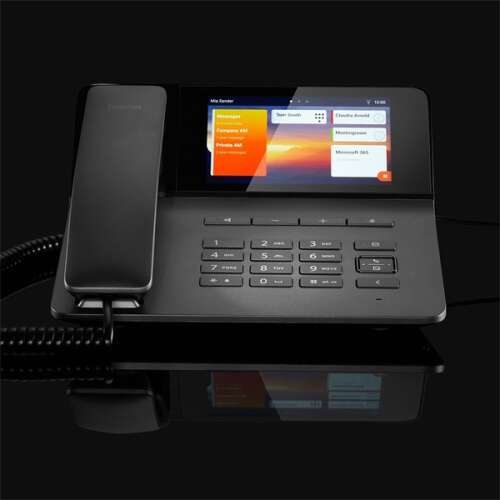
Home VoIP PBX: A Practical Guide
A home VoIP PBX can bring the features of a business phone system into your home. It lets you make and receive calls over an internet connection, manage multiple extensions and use features such as voicemail, call forwarding and call routing.
Whether you work from home, run a small business or simply want more control over your household phone service, understanding how a VoIP PBX works can help you decide whether it is right for you.
What is a VoIP PBX?
VoIP stands for Voice over Internet Protocol. Instead of carrying calls over a traditional telephone line, VoIP converts voice into data and sends it over an internet connection.
PBX stands for Private Branch Exchange. It is a phone system that manages calls between users and the outside telephone network. A VoIP PBX performs this function using internet-based technology. It can connect desk phones, cordless handsets, computers and mobile apps as extensions on the same system.
A home VoIP PBX may be hosted by a service provider, run on a device at your property or installed as software on a suitable computer or server. The best option depends on your technical confidence, budget and requirements.
What can a home VoIP PBX do?
Features vary between systems and providers, but a home VoIP PBX may include:
- Multiple extensions: Give different rooms, family members or team members their own extensions.
- Call forwarding: Send calls to another phone when you are away or unavailable.
- Voicemail: Receive messages when a call is not answered, sometimes with notifications by email or an app.
- Call routing: Direct incoming calls to the right person, device or voicemail box.
- Call transfer: Move a call from one extension to another.
- Voicemail menus: Offer callers simple options, such as choosing a person or department.
- Mobile and computer calling: Use an app as an extension, subject to the provider and system configuration.
Benefits of using VoIP at home
Flexible calling
With a suitable internet connection, you can use your phone system in more than one location. This can be helpful if you work from home but sometimes need to take calls on the move. Your number and call settings may be available across compatible devices, depending on the service.
Useful features for home businesses
A home PBX can help create a more organised and professional calling experience. For example, a business owner may use a separate business number, direct calls to a voicemail greeting outside working hours or add an extension for a colleague.
Room to expand
A PBX can make it easier to add extensions as your needs change. Instead of treating every phone as a separate service, you can manage compatible devices through one system.
Potential cost savings
Internet calling can be cost-effective, particularly for some call types and for users who already have suitable broadband. However, costs vary. Check any monthly service charges, number rental, equipment costs, call rates and charges for optional features before choosing a provider.
What do you need to get started?
The equipment and services required depend on the type of VoIP PBX you choose. In most cases, you will need:
- A reliable internet connection: Call quality depends on the stability and available capacity of your connection.
- A VoIP service or SIP provider: This may be included with a hosted PBX service or arranged separately.
- Compatible devices: These could include IP phones, a computer headset or a mobile app.
- A router and network: Your network needs to handle voice traffic reliably. Some systems support traffic prioritisation, but configuration varies.
- A power supply: Internet phones and routers usually need mains power, unlike some traditional telephones.
Before buying equipment, check that it is compatible with your PBX and service provider. Compatibility can depend on the phone model, software, account settings and supported protocols.
Hosted or self-hosted PBX?
Hosted VoIP PBX
A hosted PBX is managed by a service provider, with much of the phone system running in the provider’s cloud environment. It can be a convenient option if you want to avoid maintaining a server yourself. Check what is included in the subscription, how support is provided and what happens if the internet connection fails.
Self-hosted VoIP PBX
A self-hosted system runs on equipment or software that you manage. It can offer more control and customisation, but it may require technical knowledge to install, secure, update and troubleshoot. You will also need to consider resilience, backups and ongoing maintenance.
Choosing a home VoIP PBX
Start by identifying how you plan to use the system. A household with a few handsets may have different needs from a home-based business that handles customer calls.
- Decide how many users and extensions you need.
- Check whether you can keep or transfer an existing telephone number.
- Compare call plans, recurring fees and equipment costs.
- Check which features are included and which cost extra.
- Ask about customer support, service availability and fault reporting.
- Consider how calls will be handled during an internet or power outage.
- Review privacy and security settings, including voicemail access and account passwords.
Call quality, reliability and security
Good call quality depends on more than broadband speed alone. Network congestion, Wi-Fi coverage, router performance and other internet activity can all affect calls. Where possible, connect desk phones to the router using an Ethernet cable, and test the system at the times you expect to use it most.
VoIP also relies on power and internet access. Consider a mobile phone as a backup, or ask your provider what options are available for diverting calls during an outage. If your service is used for important calls, check how emergency calling works and ensure your registered location details are accurate where required.
Protect the system by using strong, unique passwords, keeping devices and software updated, and limiting access to administration settings. Follow your provider’s guidance on securing the router and phone system.
Is a home VoIP PBX right for you?
A home VoIP PBX may suit you if you want several extensions, business-style call handling or the flexibility to answer calls on different devices. It may be unnecessary if you only need a single, simple phone line. Compare the features and total cost with your current service, and make sure your internet connection and backup arrangements meet your needs.
With the right setup, a home VoIP PBX can make calls easier to manage and give you greater flexibility, whether you are organising household communications or running a business from home.
9 Essential Tips for Setting Up a Home VoIP PBX System
- Choose a PBX that suits your household’s call volume.
- Use a reliable broadband connection with low latency.
- Connect the PBX to your router securely.
- Set strong, unique passwords for every account.
- Enable call encryption where supported.
- Create separate extensions for household members.
- Set voicemail and call-forwarding rules carefully.
- Back up your PBX settings regularly.
- Keep the PBX software and router firmware updated.
Choose a PBX that suits your household’s call volume.
Choose a PBX that suits your household’s call volume and the number of people likely to use it at the same time. A system designed for a small household may struggle if several family members or home-based workers make frequent calls, while a larger setup could mean paying for features and capacity you don’t need. Consider how many extensions you require, how often calls overlap and whether your usage may grow, then check that the provider’s plan can handle it reliably.
Use a reliable broadband connection with low latency.
Choose a reliable broadband connection with low latency for your home VoIP PBX. A stable connection helps keep conversations clear and reduces delays, echoes and drop-outs. If possible, connect your phone system to the router using an Ethernet cable, and avoid heavy downloads or streaming during important calls.
Connect the PBX to your router securely.
Connect your home VoIP PBX to your router securely by changing default passwords, using strong, unique login details and keeping the router and PBX software up to date. Where possible, place the PBX behind the router’s firewall and avoid exposing its management interface directly to the internet. Use secure network settings and follow your provider’s guidance on ports and access controls to help protect your system from unauthorised access.
Set strong, unique passwords for every account.
Set a strong, unique password for every account connected to your home VoIP PBX, including the system administrator account, user extensions and online provider portal. Avoid reusing passwords or choosing easy-to-guess details, as a compromised account could allow someone to access your settings or make unauthorised calls. A password manager can help you create and securely store a different password for each account.
Enable call encryption where supported.
Enable call encryption where supported to help protect conversations from being intercepted as they travel over the internet. Check that your VoIP PBX, phones and service provider support encryption, and make sure it is configured at both ends of the call where required. Encryption can depend on the devices and connection used, so consult your provider’s guidance to confirm what protection is in place.
Create separate extensions for household members.
Create a separate extension for each household member to make calls easier to manage and more personal. Everyone can have their own handset, voicemail and call settings, while incoming calls can be directed to the right person without sharing one phone line. It is also handy for families with children, as you can set up extensions in shared areas and keep control over how calls are answered.
Set voicemail and call-forwarding rules carefully.
Set voicemail and call-forwarding rules carefully so callers reach the right person and important messages aren’t missed. Choose when calls should divert, which number or extension they should go to, and what happens if that device is unavailable. Record a clear voicemail greeting, check messages regularly and review your settings when your schedule or contact details change.
Back up your PBX settings regularly.
Back up your home VoIP PBX settings regularly so you can restore your system if it fails, is reset or needs replacing. A backup can preserve important details such as extensions, call routing, voicemail settings and other custom configurations, saving time and reducing disruption. Store a copy securely somewhere separate from the PBX, and check periodically that it can be accessed when needed.
Keep the PBX software and router firmware updated.
Keep your PBX software and router firmware up to date to benefit from security fixes, bug patches and performance improvements. Enable automatic updates where appropriate, or check regularly for new releases and follow the manufacturer’s instructions when installing them. Before updating, back up your PBX settings and choose a time when a brief interruption to your phone service will cause minimal disruption.
Tags: call forwarding, call quality, call routing, call transfer, cost savings, emergency calling, home business phone system, home voip pbx, hosted pbx, internet calling, internet connection, ip phones, mobile calling, network security, pbx equipment, phone extensions, private branch exchange, self-hosted pbx, sip provider, voicemail, voip