
Cisco Unified Communications and Collaboration
Modern organisations need reliable ways for people to communicate, whether they are in the office, working remotely or speaking with customers. Cisco Unified Communications and Collaboration brings together calling, messaging, meetings and collaboration tools to help teams stay connected across locations and devices.
What is Cisco Unified Communications and Collaboration?
Cisco Unified Communications and Collaboration refers to technologies that combine different forms of communication in a connected environment. Instead of relying on separate systems for desk phones, video meetings and instant messaging, an organisation can bring these capabilities together and manage them as part of a broader communications strategy.
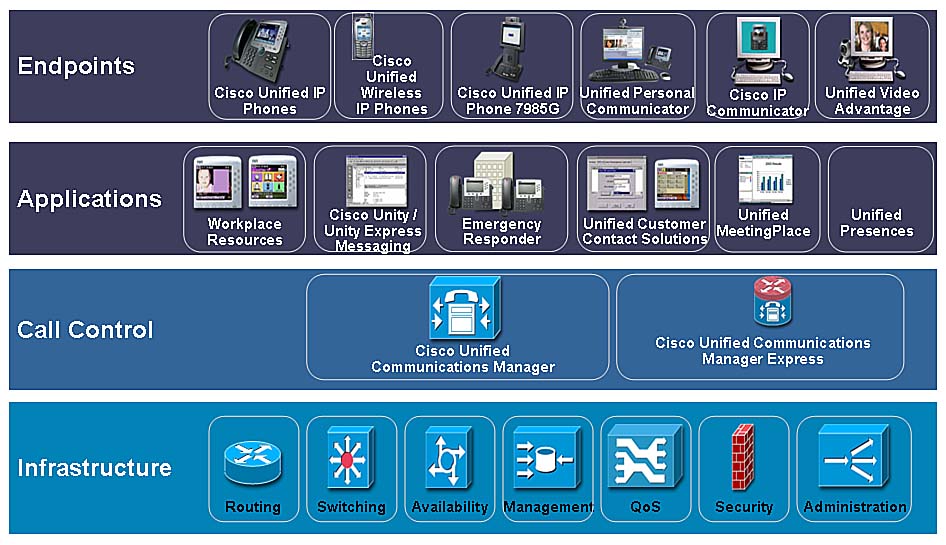
Cisco’s portfolio includes calling and meeting services, collaboration applications, devices and infrastructure. Depending on an organisation’s requirements, services may be delivered through the cloud, hosted on the organisation’s own infrastructure, or provided through a hybrid approach.
Key capabilities
- Business calling: Users can make and receive calls using supported desk phones, computers and mobile devices. Features may include call transfer, voicemail, call handling and directory services.
- Video meetings: Teams can hold online meetings, share content and collaborate with colleagues, customers and partners in different locations.
- Messaging and presence: Messaging tools and availability indicators make it easier to see whether colleagues are available and to choose an appropriate way to contact them.
- Collaboration devices: Cisco offers a range of devices for desks, meeting rooms and shared spaces, designed to support calls and video collaboration.
- Administration and integration: Management tools and integrations can help connect communications with business processes and other applications.
The specific features available depend on the products, services, licences and configuration chosen. Organisations should confirm current capabilities and requirements with Cisco or an authorised provider.
Cloud, on-premises and hybrid options
There is no single deployment model that suits every organisation. A cloud-based service can reduce the need to maintain some communications infrastructure on site and may make it easier to support distributed teams. An on-premises system can offer greater control over certain aspects of the environment, but usually requires in-house or outsourced management of the infrastructure. A hybrid design can combine elements of both.
Choosing an approach involves looking at existing systems, network capacity, security policies, regulatory obligations, business continuity needs and the organisation’s plans for growth. A phased migration may also help limit disruption, particularly where phone services are essential to daily operations.
Potential benefits for organisations
When carefully planned and implemented, a unified communications environment can make it easier for employees to work across locations and devices. Bringing communication services together may simplify the user experience, support flexible working and reduce the number of separate tools teams need to manage.
It can also help organisations create more consistent ways to communicate with customers and colleagues. For example, staff may be able to move between a desk phone, computer and mobile device while retaining access to familiar business calling features.
These benefits are not automatic. They depend on good network performance, appropriate system design, staff training and ongoing management.
Planning a Cisco collaboration solution
Before selecting or upgrading a solution, organisations should assess how people communicate today and identify the problems they want to solve. Useful questions include:
- Which calling, meeting and messaging features do different teams need?
- How many users and locations must the system support?
- What existing phones, applications and network services need to be retained or replaced?
- How will remote and mobile users connect securely?
- What resilience, support and business continuity arrangements are required?
- How will the service be monitored, maintained and expanded over time?
It is also important to consider accessibility, call quality, emergency calling arrangements and staff adoption. Testing with a representative group of users can reveal practical issues before a wider rollout.
Security and ongoing management
Communications systems carry business conversations and can contain sensitive information. Security should therefore be considered throughout the design and operational lifecycle. Organisations should review access controls, device management, software updates, network security and data handling in line with their own policies and applicable requirements.
Ongoing monitoring is equally important. Regular checks of call quality, system availability, user feedback and licence usage can help identify issues and ensure the solution continues to meet business needs.
Bringing teams together
Cisco Unified Communications and Collaboration offers organisations a range of tools for calling, meetings and teamwork. The right solution depends on how people work, the systems already in place and the level of control and flexibility required. With clear planning, a suitable deployment model and effective support, organisations can build a communications environment that helps people collaborate wherever work takes place.
8 Essential Tips for Cisco Unified Communications and Collaboration
- Prioritise voice and video traffic with end-to-end QoS.
- Keep Cisco Unified Communications software and devices up to date.
- Use strong authentication and restrict administrative access.
- Back up call-control and messaging configurations regularly.
- Monitor call quality, latency, jitter and packet loss.
- Test failover plans for critical calling services.
- Check headset and room-device compatibility before deployment.
- Train users on collaboration features and meeting etiquette.
Prioritise voice and video traffic with end-to-end QoS.
Prioritise voice and video traffic with end-to-end Quality of Service (QoS) to help Cisco Unified Communications and Collaboration perform reliably, even when the network is busy. Configure consistent QoS policies across the entire path—from user devices and wireless access points through switches and routers to the WAN—so real-time traffic receives appropriate priority over less time-sensitive data. Correctly classify and mark voice and video packets, and check that those markings are preserved across network boundaries. Regularly monitor latency, jitter and packet loss, as QoS can only help when it is configured consistently and supported by sufficient network capacity.
Keep Cisco Unified Communications software and devices up to date.
Keep Cisco Unified Communications software and devices up to date to help maintain security, reliability and compatibility across your organisation. Install approved updates and firmware in line with Cisco’s guidance, but plan changes carefully: check release notes, test updates where possible, and schedule deployment to minimise disruption. Regular updates can also provide access to new features and fixes, helping your communications systems run smoothly for users in the office and remotely.
Use strong authentication and restrict administrative access.
Use strong authentication to help protect Cisco Unified Communications and Collaboration accounts from unauthorised access. Require unique user credentials and, where supported, multi-factor authentication, particularly for administrators. Restrict administrative access to authorised personnel, use role-based permissions so each person has only the access they need, and review accounts regularly. Removing or updating access promptly when roles change or staff leave can further reduce security risks.
Back up call-control and messaging configurations regularly.
Back up your Cisco Unified Communications and Collaboration call-control and messaging configurations regularly to help protect essential settings and reduce downtime if a system fails, an update causes problems or a configuration is changed by mistake. Store backups securely, keep copies separate from the systems they protect, and check periodically that they can be restored successfully. Include backup tasks in your maintenance schedule and follow the guidance for your specific Cisco products and deployment.
Monitor call quality, latency, jitter and packet loss.
Monitor call quality regularly by tracking latency, jitter and packet loss across your network. High latency can cause noticeable delays, while jitter and packet loss may lead to choppy audio, dropped words or unstable video. Reviewing these measures helps identify network issues early, so they can be resolved before they disrupt Cisco Unified Communications and Collaboration services.
Test failover plans for critical calling services.
Regularly test failover plans for critical calling services to confirm that calls can be rerouted if a system, site or network connection becomes unavailable. Include the people, devices and external numbers your organisation relies on, and check that emergency and customer-facing calls are handled correctly. Record any issues, update procedures and retest after significant changes to your Cisco Unified Communications and Collaboration environment.
Check headset and room-device compatibility before deployment.
Before deploying Cisco Unified Communications and Collaboration, check that headsets and room devices are compatible with your chosen platform, software versions and connection methods. Confirm that essential features—such as call controls, microphone muting, audio quality and device management—work as expected, and test equipment in the environments where it will be used. A small-scale trial can uncover connectivity or usability issues early, helping avoid disruption and ensuring people have the right equipment from day one.
Train users on collaboration features and meeting etiquette.
Training users to make the most of collaboration features can help teams get more value from Cisco Unified Communications and Collaboration. Show staff how to use tools such as screen sharing, chat, mute controls and meeting recording, and provide guidance on good online meeting etiquette. Joining on time, muting when not speaking, using clear audio and giving others space to contribute can make meetings more focused, inclusive and productive.
Tags: administration, business calling, business continuity, call quality, cisco collaboration, cisco unified communications and collaboration, cisco webex, cloud communications, collaboration devices, communications infrastructure, hybrid deployment, messaging, migration planning, mobile users, network capacity, on-premises communications, ongoing management, presence, remote work, security, system integration, unified communications, user training, video meetings