
VoIP Virtual PBX: A Flexible Phone System for Modern Businesses
A reliable telephone system is still essential for many businesses, but traditional office phone lines can be costly and difficult to adapt as a company grows. A VoIP virtual PBX offers an alternative: it uses an internet connection to manage business calls, helping teams stay connected whether they are in the office, working remotely or spread across several locations.
What is a virtual PBX?
A PBX, or private branch exchange, manages calls within an organisation and connects staff with people outside it. A virtual PBX performs these functions through an online service rather than relying on a traditional, on-site telephone exchange.
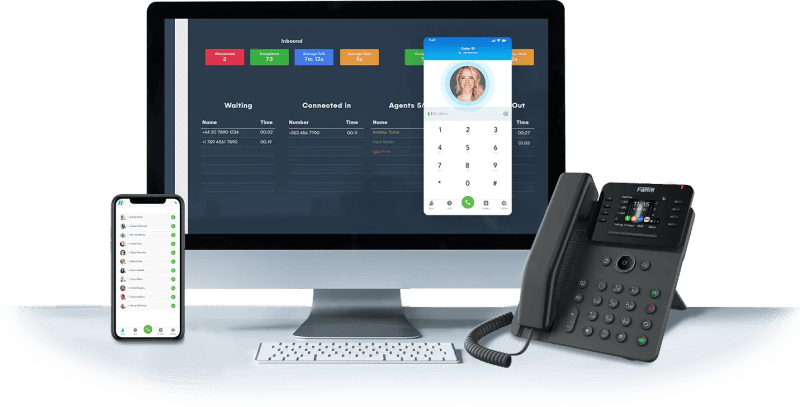
VoIP stands for Voice over Internet Protocol. It carries voice calls over an internet connection instead of conventional phone lines. Together, VoIP and a virtual PBX provide a business phone system that can be managed online and accessed through compatible desk phones, computers or mobile devices.
How does a VoIP virtual PBX work?
When someone calls a business number, the virtual PBX directs the call according to the company’s settings. It could ring a team, route the caller to a particular department, play an announcement or direct the call to voicemail. Staff can make and receive calls using an internet-connected device, often with the business number displayed to the person they are calling.
Administrators can usually manage settings through an online portal. Depending on the provider and package, this may include adding users, changing call routes and updating opening hours without needing to configure equipment in the office.
Common features
Features vary between providers, but a VoIP virtual PBX may include:
- Call routing: Direct calls to the right person or team.
- Auto-attendant: Greet callers and offer menu options, such as “Press 1 for sales”.
- Call queues: Place callers in a queue when staff are busy.
- Voicemail: Receive messages when calls cannot be answered.
- Call forwarding: Send calls to another number or device.
- Business hours: Apply different call handling during and outside opening hours.
- Mobile and desktop apps: Make and receive business calls away from a desk.
- Call reporting: Review information such as call volumes and missed calls, where available.
Benefits for businesses
Work from different locations
Because the system operates online, staff may be able to use their business phone service from the office, home or while travelling. This can make it easier to maintain a consistent point of contact across a distributed team.
Adapt as your business changes
Adding users, changing call flows or supporting another location may be simpler than making changes to a traditional phone system. This flexibility can be useful for growing businesses and organisations with changing staffing needs.
Present a professional image
Features such as a main business number, a tailored greeting and clear department options can help callers reach the right person. A virtual PBX can also help smaller organisations manage calls in a structured way.
Manage the system online
Many virtual PBX services include an online control panel for day-to-day administration. This can reduce reliance on physical equipment at each site, although the precise setup and support available depend on the provider.
What do you need to use one?
A VoIP virtual PBX needs a suitable internet connection and compatible devices. These might be VoIP desk phones, headsets and computers, or mobile phones running a provider’s app. The quality of calls depends in part on the reliability and capacity of the internet connection, so it is worth checking that your network can support voice traffic alongside other business activity.
Businesses should also consider their backup arrangements. If the internet connection or power fails, calls may be affected. Depending on the service, call forwarding to mobile numbers or another location may help maintain continuity.
Choosing a VoIP virtual PBX
Before selecting a system, consider how your organisation handles calls now and what it may need in the future. Useful questions include:
- How many users and locations need to be connected?
- Do staff need to make and receive calls on mobile devices?
- Which features are essential, and which are optional?
- Can the system support your existing numbers or number porting requirements?
- What support is available if there is a fault or service disruption?
- Are pricing, contract terms and any additional charges clear?
- What security measures and account controls does the provider offer?
It is also sensible to check call quality and coverage requirements before making a change. A provider can explain the equipment, connectivity and setup needed for your particular circumstances.
Is a virtual PBX right for your business?
A VoIP virtual PBX may suit businesses that want flexible call handling without managing a traditional on-site phone exchange. It can be particularly useful for teams working across multiple locations or requiring access to business calls while away from the office.
The right solution depends on your internet connection, call patterns, budget and operational needs. Comparing features and support carefully can help you choose a system that works well today and can adapt as your business develops.
Top 9 Advantages of VoIP Virtual PBX: Cost-Effective, Flexible, and Scalable Solutions for Modern Businesses
- Lower costs than many traditional phone systems
- Easy to add or remove users
- Supports remote and hybrid working
- Routes calls to the right teams
- Uses business numbers across devices
- Offers voicemail and call forwarding
- Can provide an auto-attendant
- Managed online without on-site PBX hardware
- Scales as your business grows
Potential Drawbacks of VoIP Virtual PBX Systems: Reliability, Costs, and Setup Challenges
- Call quality depends on a reliable internet connection.
- Power or broadband outages can disrupt calls.
- Some features may cost extra.
- Setup and number porting can take time.
Lower costs than many traditional phone systems
A VoIP virtual PBX can cost less than many traditional phone systems because it uses an internet connection rather than relying on extensive on-site equipment and dedicated phone lines. This can reduce initial setup and ongoing maintenance costs, while online management makes it easier to add users or adjust call settings as your business changes. Actual savings depend on your provider, usage and internet requirements, so it is worth comparing the full costs before choosing a system.
Easy to add or remove users
Easy to add or remove users
A VoIP virtual PBX makes it simple to update your phone system as your team changes. You can add a new user when someone joins, or remove access when they leave, often through an online control panel rather than by installing or reconfiguring physical phone lines. This flexibility helps businesses keep their system aligned with current staffing needs and avoid paying for unused extensions.
Supports remote and hybrid working
A VoIP virtual PBX supports remote and hybrid working by allowing staff to make and receive business calls wherever they have a suitable internet connection. Using a desk phone, computer or mobile app, employees can stay connected to colleagues and customers without being tied to the office. Calls can also be routed to the right person or device, helping teams maintain a consistent, professional service across different locations.
Routes calls to the right teams
A VoIP virtual PBX can route incoming calls to the right teams quickly and efficiently. Callers can choose from menu options, such as sales or customer support, or calls can be directed according to your business hours and team availability. This helps customers reach the people best placed to assist them, while reducing unnecessary transfers and interruptions for other staff.
Uses business numbers across devices
A VoIP virtual PBX lets staff use their business number across compatible devices, including desk phones, computers and mobiles. This means they can make and receive work calls whether they are in the office or working remotely, while keeping their personal number private and presenting a consistent, professional point of contact to customers.
Offers voicemail and call forwarding
A VoIP virtual PBX helps businesses stay responsive with voicemail and call forwarding. If a call cannot be answered, callers can leave a message for staff to follow up, while forwarding can send calls to another colleague, device or location. This makes it easier to handle enquiries outside the office or during busy periods, helping important calls reach the right person.
Can provide an auto-attendant
A VoIP virtual PBX can include an auto-attendant that greets callers and directs them to the right person or department using simple menu options. This helps businesses handle incoming calls more efficiently, even when reception staff are unavailable, and gives callers a clear, professional experience from the moment they get in touch.
Managed online without on-site PBX hardware
A VoIP virtual PBX is managed online, so there’s no need to install or maintain a traditional PBX unit at your premises. Administrators can adjust users, call routing and other settings through an online portal, making it easier to manage the phone system without dedicated on-site hardware.
Scales as your business grows
A VoIP virtual PBX can grow alongside your business, making it easier to add users, phone lines and new locations as your needs change. Instead of investing in major on-site equipment, you can adjust your service through your provider, helping your phone system keep pace with new employees, teams or offices.
Call quality depends on a reliable internet connection.
Call quality on a VoIP virtual PBX depends on a reliable internet connection. If your connection is slow, unstable or shared with heavy online activity, calls may suffer from delays, echoing, drop-outs or distorted sound. This can disrupt conversations and create a poor impression for customers, so it is important to have a stable connection with enough capacity for your business’s needs.
Power or broadband outages can disrupt calls.
A VoIP virtual PBX relies on power and a stable broadband connection, so an outage can interrupt calls or make the system unavailable. This may affect both incoming and outgoing calls, particularly if desk phones, routers or other network equipment lose power. Businesses can reduce the risk by arranging backup power, keeping a reliable mobile connection available and setting calls to divert to another number during an outage.
Some features may cost extra.
Some VoIP virtual PBX features may come at an additional cost, so the advertised package may not include everything your business needs. Options such as call recording, advanced analytics, extra numbers or integrations can increase the monthly bill. Check what is included, review any usage or setup charges, and compare the total cost of the features you require before choosing a provider.
Setup and number porting can take time.
Setting up a VoIP virtual PBX and transferring existing phone numbers can take time. Configuration, equipment installation and number porting may involve several steps and coordination with your current and new providers. During the transition, it’s important to plan ahead, confirm timescales and arrange suitable call forwarding or other temporary measures to help avoid disruption.
Tags: auto-attendant, business calls, business communications, business hours, business number, business phone system, call forwarding, call quality, call queues, call reporting, call routing, cloud-based pbx, internet connection, mobile and desktop apps, multi-location businesses, online phone system, pbx provider, phone system features, phone system security, remote work, virtual pbx, virtual phone system, voice over internet protocol, voicemail, voip desk phones, voip virtual pbx