
Cisco CTI Manager: What It Is and How It Works
Cisco CTI Manager is a service within Cisco Unified Communications Manager (Unified CM) that allows software applications to interact with a telephone system. CTI stands for Computer Telephony Integration: the linking of phone calls and telephony features with computer applications.
By providing this connection, CTI Manager helps organisations bring calling functions into tools such as customer relationship management (CRM) platforms, contact-centre applications and operator consoles. Users may be able to handle calls from a computer screen rather than relying solely on a desk phone.
What does Cisco CTI Manager do?
CTI Manager coordinates communication between CTI-enabled applications and devices or call-control features managed by Unified CM. Applications connect using Cisco telephony APIs, commonly JTAPI or TAPI, and can request supported actions or receive information about call events.
Depending on the application, CTI features can include:
- Making, answering and ending calls from a desktop application
- Putting calls on hold and retrieving them
- Transferring calls or starting a conference
- Displaying caller details, such as a matching customer record
- Monitoring call states and selected devices
- Controlling supported CTI ports and route points
The precise features available depend on the application, its permissions, the devices involved and the Unified CM configuration.
How CTI Manager fits into a Cisco environment
CTI Manager is part of the wider Unified CM call-control environment; it is not a standalone phone system. A CTI application connects to a CTI Manager service and requests access to specified devices or features. Unified CM then applies its call-control rules and permissions.
For example, when an agent clicks a customer’s phone number in a CRM system, the application may send a request to place a call through Unified CM. CTI Manager helps provide the interface between that application and the managed telephony resources. Call events can also be returned to the application, allowing it to update the user interface as the call progresses.
CTI Manager and CTI devices
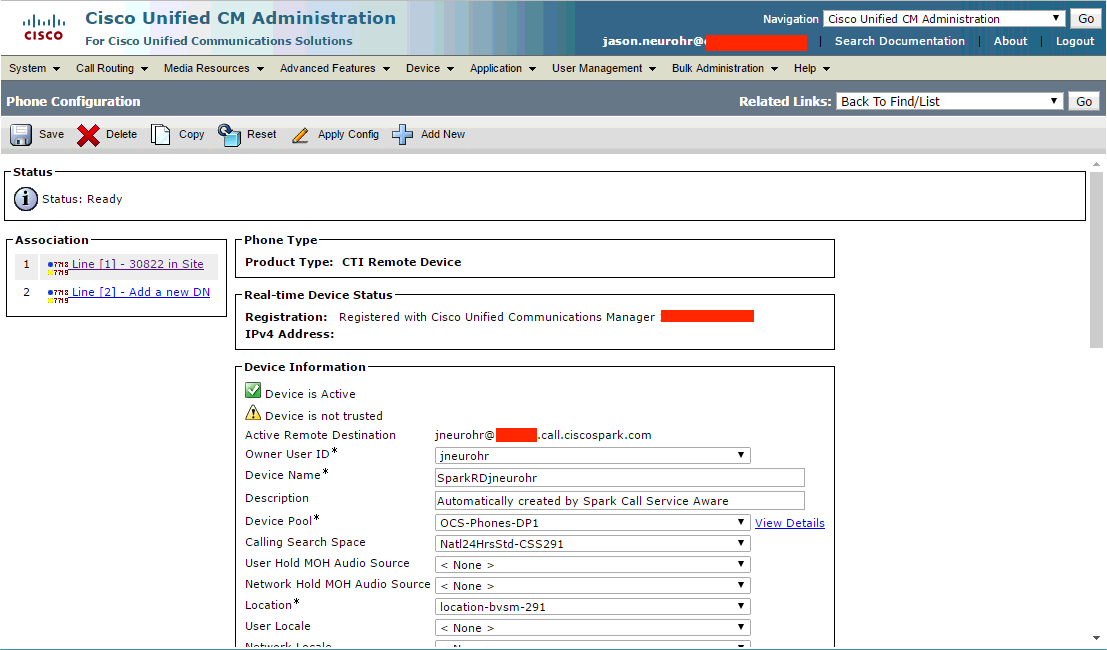
CTI applications do not automatically have access to every phone or call feature in an organisation. Administrators configure which users, applications and devices may be controlled or monitored. Depending on the use case, this can involve standard phones, software phones, CTI ports or CTI route points.
A CTI route point is a virtual device that can direct calls to an application or service. CTI ports are virtual devices used in some application and contact-centre designs. These resources need to be configured appropriately in Unified CM and supported by the connected application.
Why businesses use CTI
Integrating telephony with business software can reduce repetitive tasks and give staff more context during customer interactions. A screen-pop, for instance, can display a caller’s record when a call arrives. Click-to-call can make outbound calling quicker, while call control within a contact-centre interface can help agents manage conversations without switching between applications.
CTI can also support more consistent workflows by linking call handling to customer-service or operational processes. The benefits depend on the quality of the integration and how well it is designed around users’ day-to-day work.
Configuration and security considerations
Successful CTI deployment requires coordination between telephony administrators and the team responsible for the application. Key considerations include:
- Application compatibility: Confirm that the application supports the relevant Cisco APIs and Unified CM environment.
- Permissions: Grant applications access only to the users, devices and functions they need.
- Network connectivity: Ensure the application can reach the appropriate Unified CM services and that network rules allow the required traffic.
- Resilience: Review how the application connects to CTI Manager services and what happens if a server or network path becomes unavailable.
- Testing: Check call control, event updates, user permissions and recovery behaviour before making changes in a live environment.
Because CTI applications can control calls and access telephony information, security should be considered from the outset. Use appropriate authentication, restrict access and follow the organisation’s policies for handling customer data.
Common troubleshooting checks
If a CTI application cannot connect or control a phone, begin by checking that the relevant CTI Manager service is running and that the application is configured to connect to the correct Unified CM environment. Then verify the application’s credentials and permissions, the device association, network reachability and any relevant firewall rules.
It is also useful to review application and Unified CM logs, note when the issue began and check whether recent configuration changes could be involved. If only one user or device is affected, compare its settings with those of a working user or device. For wider or recurring problems, consult the relevant Cisco documentation and involve the organisation’s Unified CM administrator or support provider.
In summary
Cisco CTI Manager provides an important link between business applications and telephony features in Cisco Unified CM. When configured and secured properly, it enables capabilities such as click-to-call, screen-pops and application-based call handling. The best results come from careful planning, compatible software, suitable permissions and thorough testing.
Cisco CTI Manager and Unified Communications Manager: Frequently Asked Questions
- What is CTI in call centers?
- How to access Cisco call manager?
- What is the full form of Cisco CUCM?
- What is CUCM used for?
- What is CTI in Cisco Call Manager?
- What is the maximum CTI connections for a Cisco CUCM?
- What is Cisco Unified Communications Manager used for?
What is CTI in call centers?
CTI (Computer Telephony Integration) in a call centre connects the telephone system with applications such as customer relationship management (CRM) software. It can help agents handle calls from their computer, display a caller’s customer record when a call arrives, and make it easier to transfer or manage calls. By bringing call information and customer details together, CTI can support smoother workflows and more informed customer service.
How to access Cisco call manager?
To access Cisco Call Manager, open a web browser on a network with access to your organisation’s Cisco Unified Communications Manager (Unified CM) system and go to its administration address, usually https://<server-name-or-IP>/ccmadmin. Sign in with an authorised account; the pages and settings available depend on your assigned permissions. If you cannot reach the address, you may need to connect to your organisation’s network or VPN, or ask your IT administrator for the correct URL and access rights. The CTI Manager itself is a Unified CM service, rather than a separate user-facing website.
What is the full form of Cisco CUCM?
Cisco CUCM stands for Cisco Unified Communications Manager. It is Cisco’s call-control platform for managing voice and video calls, phones and other communication services across an organisation. You may also see it referred to by its former name, Cisco Unified CallManager.
What is CUCM used for?
Cisco Unified Communications Manager (CUCM) is used to manage an organisation’s voice and video communications. It controls call routing and call-handling features for devices such as desk phones and softphones, and can integrate with applications and collaboration tools. In a CTI setup, CUCM provides the call-control environment that applications connect to through services such as Cisco CTI Manager.
What is CTI in Cisco Call Manager?
CTI in Cisco Call Manager (now Cisco Unified Communications Manager) stands for Computer Telephony Integration. It enables compatible applications, such as CRM or contact-centre software, to interact with the phone system—for example, to make, answer or transfer calls, monitor call status and display caller information. Cisco CTI Manager supports this communication between applications and Unified CM, subject to the system’s configuration and permissions.
What is the maximum CTI connections for a Cisco CUCM?
The commonly quoted limit is up to 8,000 CTI connections per Cisco Unified Communications Manager (CUCM) node, rather than per cluster. The practical supported capacity can vary with the CUCM release, server platform and deployment, and CTI connections are different from the number of CTI-controlled devices. For an exact limit, check the capacity and sizing documentation for your specific CUCM version and configuration.
What is Cisco Unified Communications Manager used for?
Cisco Unified Communications Manager (Unified CM) is used to manage and control an organisation’s phone and video-calling services. It registers devices such as desk phones and softphones, routes calls, and provides features including voicemail integration, call forwarding, conferencing and directory services. It can also connect with applications and contact-centre tools, enabling features such as computer telephony integration (CTI).
Tags: call control, call handling, call monitoring, cisco cti manager, cisco telephony apis, cisco unified communications manager, click-to-call, computer telephony integration, contact-centre applications, crm integration, cti, cti applications, cti configuration, cti devices, cti ports, cti route points, cti security, cti troubleshooting, jtapi, screen-pop, tapi, telephony integration, unified cm