
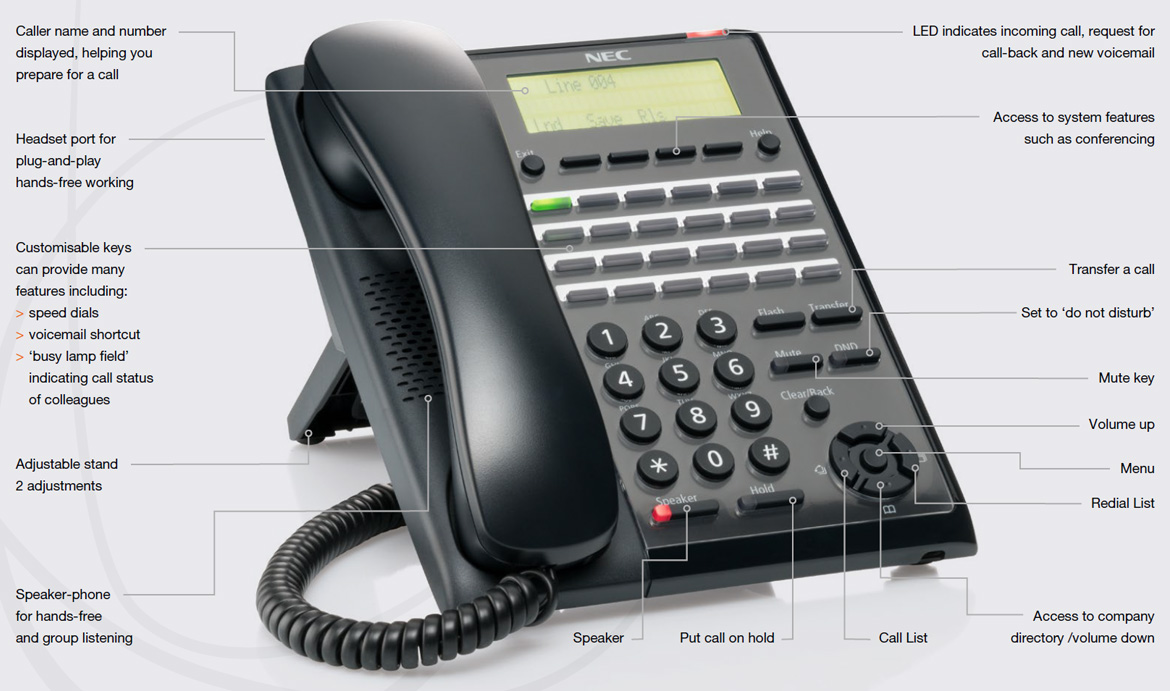
The NEC SL2100 Phone System: Enhancing Communication in the Workplace
In today’s fast-paced business environment, effective communication is key to success. The NEC SL2100 phone system is a cutting-edge solution that empowers organisations to streamline their communication processes and boost productivity.
Designed with small to medium-sized businesses in mind, the NEC SL2100 offers a range of features that cater to the modern workplace. From advanced call handling capabilities to seamless integration with other communication tools, this system is a game-changer for businesses looking to enhance their connectivity.
One of the standout features of the NEC SL2100 is its scalability. Whether your business is just starting out or expanding rapidly, this phone system can grow with you. With flexible licensing options and a modular design, you can customise the system to meet your specific needs without breaking the bank.
Another key benefit of the NEC SL2100 is its user-friendly interface. Intuitive controls and easy-to-navigate menus make it simple for employees to take full advantage of all the system has to offer. Training time is minimal, allowing your team to focus on their core tasks without getting bogged down by complex technology.
Furthermore, the NEC SL2100 prioritises security and reliability. With built-in encryption protocols and robust data protection measures, you can rest assured that your communications are safe from prying eyes. The system also boasts high uptime rates, ensuring that you stay connected when it matters most.
Whether you are looking to improve customer service, increase internal collaboration, or simply streamline your day-to-day operations, the NEC SL2100 phone system is a smart investment for any business. Discover how this innovative solution can transform your workplace communication today.
Essential FAQs for the NEC SL2100 Phone System: Login, Availability, Cost, IP Address, and Button Programming
- How do I log into my NEC SL2100?
- Is NEC SL2100 discontinued?
- What is the cost of NEC SL2100 phone system?
- How do I find my SL2100 IP address?
- How to program NEC phone buttons?
How do I log into my NEC SL2100?
Logging into your NEC SL2100 phone system is a straightforward process that allows you to access its full range of features and functionalities. To log in, simply enter your designated login credentials, which typically include a username and password provided by your system administrator. Once logged in, you can customise settings, manage calls, access voicemail, and utilise various communication tools to streamline your workflow. If you encounter any difficulties logging in or require assistance with your NEC SL2100 system, feel free to reach out to our support team for prompt and reliable guidance.
Is NEC SL2100 discontinued?
The question of whether the NEC SL2100 phone system is discontinued is a common one among businesses considering their communication options. As of the latest information available, NEC has not officially announced the discontinuation of the SL2100 system. However, it’s always advisable to check with authorised NEC dealers or representatives for the most up-to-date information on product availability and support. Keeping abreast of any developments in the product line can help businesses make informed decisions about their communication infrastructure and plan for any potential transitions in the future.
What is the cost of NEC SL2100 phone system?
The cost of the NEC SL2100 phone system can vary depending on several factors, including the size of your organisation, the specific features and functionalities you require, and any additional services or customisations. It is recommended to contact an authorised NEC SL2100 provider for a detailed quote tailored to your business needs. By discussing your requirements with a professional, you can receive a comprehensive pricing package that aligns with your budget and communication goals.
How do I find my SL2100 IP address?
To find the IP address of your NEC SL2100 phone system, you can follow these simple steps. First, press the “Menu” button on your phone and navigate to the “System Data” option. From there, select “Network Information” and look for the IP address listed on the screen. Alternatively, you can access the system’s web-based management interface using a computer connected to the same network. Log in with your credentials and navigate to the network settings section to view the IP address of your SL2100 system. By following these steps, you can easily locate the IP address of your NEC SL2100 phone system for configuration and troubleshooting purposes.
How to program NEC phone buttons?
Programming NEC phone buttons on the SL2100 phone system is a straightforward process that allows users to customise their phone settings for enhanced efficiency and convenience. To program NEC phone buttons, simply access the system’s programming mode and follow the step-by-step instructions provided in the user manual or by your system administrator. By assigning specific functions or speed dial numbers to these programmable buttons, users can tailor their phone’s features to suit their individual needs, making daily tasks such as placing calls or accessing key functions quicker and more intuitive. With the flexibility and ease of programming NEC phone buttons on the SL2100 system, users can personalise their communication experience and maximise productivity in the workplace.
Tags: business environment, call handling capabilities, communication, data protection measures, encryption protocols, integration, licensing options, modular design, nec sl2100, nec sl2100 phone system, phone system, productivity, reliability, scalability, security, small to medium-sized businesses, uptime rates, user-friendly interface, workplace