
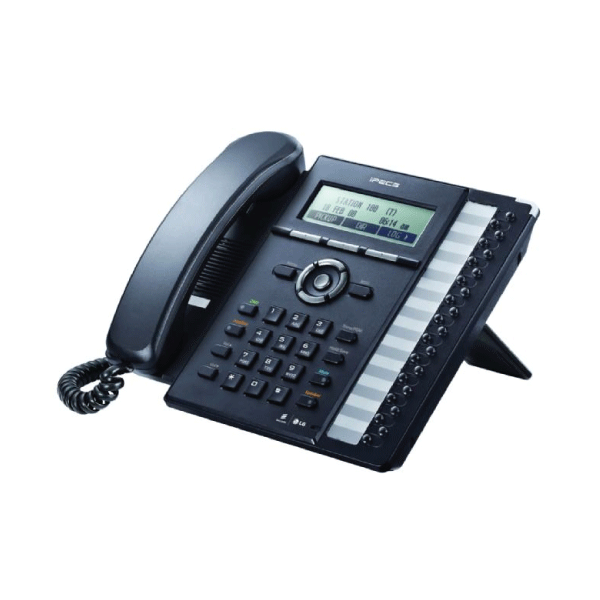
Exploring the LG Ericsson iPECS Phone System
The LG Ericsson iPECS phone system is a cutting-edge communication solution designed to meet the needs of modern businesses. This innovative system combines advanced features with user-friendly interfaces, making it a popular choice for organisations looking to streamline their communication processes.
One of the key benefits of the iPECS phone system is its scalability. Whether you are a small business with a handful of employees or a large enterprise with multiple locations, the iPECS system can be tailored to suit your specific requirements. This flexibility allows businesses to expand and adapt their communication infrastructure as they grow.
Another standout feature of the iPECS phone system is its reliability. Built on robust technology and backed by LG Ericsson’s reputation for quality, this system offers unparalleled performance and uptime. Businesses can rely on the iPECS system to keep them connected with customers, partners, and colleagues at all times.
In addition to its core calling capabilities, the iPECS phone system offers a range of advanced features to enhance productivity and collaboration. From voicemail-to-email integration to mobile app support, users can stay connected and productive no matter where they are.
Furthermore, the iPECS phone system is designed with ease of use in mind. Intuitive interfaces and simple controls make it easy for employees to take full advantage of the system’s capabilities without extensive training or technical expertise.
Overall, the LG Ericsson iPECS phone system represents a powerful tool for businesses seeking to improve their communication infrastructure. With its scalability, reliability, advanced features, and user-friendly design, this system is sure to meet the diverse needs of modern organisations.
Essential FAQs about the LG Ericsson iPECS Phone System
- How to call on iPECS phone?
- What is an iPECS phone?
- How do I connect my phone to iPECS?
- What is the password for LG iPECS?
- How do I make a call on iPECS?
- How to connect iPECS phone?
- What is an iPECS phone system?
- How do I divert calls on my Ericsson desk phone?
How to call on iPECS phone?
To make a call on the LG Ericsson iPECS phone system, simply pick up the handset or press the speakerphone button to activate the dial tone. Then, dial the desired phone number using the keypad on the phone. If you are calling an internal extension within your organisation, you can usually dial the extension number directly. Once you have entered the number, press the call button or wait for a few seconds for the call to connect. Remember to end the call by hanging up the handset or pressing the end call button when you are finished.
What is an iPECS phone?
An iPECS phone is a key component of the LG Ericsson iPECS phone system, serving as the primary communication device for users within an organisation. These phones are designed to work seamlessly with the iPECS system, offering a range of features and functionalities to enhance communication efficiency. From making and receiving calls to accessing voicemail, managing contacts, and utilising advanced calling features, an iPECS phone provides users with a comprehensive tool for staying connected and productive in their day-to-day operations. With user-friendly interfaces and intuitive controls, iPECS phones make it easy for employees to leverage the full capabilities of the system without extensive training.
How do I connect my phone to iPECS?
To connect your phone to the LG Ericsson iPECS phone system, you will typically need to follow a few simple steps. Firstly, ensure that your phone is compatible with the iPECS system and that it supports the required connectivity protocols. Next, connect your phone to the network using an Ethernet cable or through a wireless connection, depending on the setup of your system. Once physically connected, you may need to configure the phone settings to enable it to communicate with the iPECS system. This may involve entering specific IP addresses or credentials provided by your system administrator. By following these steps and consulting any relevant user guides or documentation, you can successfully connect your phone to the iPECS system and start enjoying its communication features.
What is the password for LG iPECS?
One common query regarding the LG Ericsson iPECS phone system is, “What is the password for LG iPECS?” The default password for accessing the LG iPECS system may vary depending on the specific model and configuration. It is important to consult the user manual or contact your system administrator to obtain the correct password for your particular setup. Ensuring secure access to the iPECS system is crucial for protecting sensitive data and maintaining smooth operation of communication processes within your organisation.
How do I make a call on iPECS?
To make a call on the LG Ericsson iPECS phone system, simply pick up the handset or press the speakerphone button to activate the dial tone. Then, dial the desired phone number using the keypad. If you are making an internal call within your organisation, you can typically dial the extension number directly. Once you have entered the number, press the call button or wait for the system to automatically connect your call. The iPECS system makes it easy and straightforward to initiate calls, whether you are reaching out within your office or contacting external parties.
How to connect iPECS phone?
Connecting an iPECS phone is a straightforward process that typically involves plugging the phone into a compatible Ethernet port using an Ethernet cable. The iPECS phone system is designed to be easy to set up, and most models come with clear instructions on how to connect them to the network. Once connected, users may need to configure the phone settings, such as IP address and extension number, which can usually be done through the phone’s interface or via a web-based configuration tool. If further assistance is required, referring to the user manual or contacting technical support from LG Ericsson can help ensure a smooth connection process for the iPECS phone.
What is an iPECS phone system?
The iPECS phone system by LG Ericsson is a sophisticated communication solution that caters to the diverse needs of modern businesses. It is a comprehensive telephony platform that offers advanced features, scalability, and reliability. The iPECS system enables organisations to streamline their communication processes, enhance productivity, and stay connected with customers and colleagues effectively. With intuitive interfaces and user-friendly controls, the iPECS phone system is designed to be accessible to users of all levels of technical expertise. Overall, the iPECS phone system is a powerful tool that empowers businesses to elevate their communication infrastructure and adapt to evolving requirements with ease.
How do I divert calls on my Ericsson desk phone?
To divert calls on your LG Ericsson iPECS desk phone, simply follow these steps: First, pick up the handset or press the speakerphone button to activate the phone. Then, press the “Divert” or “Forward” button on the phone’s keypad. Next, enter the desired number to which you want calls to be diverted, followed by the appropriate code (e.g., for immediate diversion or after a certain number of rings). Finally, press the “Divert” or “Enter” button to confirm the call diversion settings. Remember to deactivate call diversion when no longer needed to ensure all calls come through to your desk phone as usual.
Tags: advanced features, calling capabilities, collaboration, communication solution, ease of use, ipecs phone system, lg ericsson, lg ericsson ipecs phone system, mobile app support, modern businesses, productivity, reliability, scalability, user-friendly design, voicemail-to-email integration