
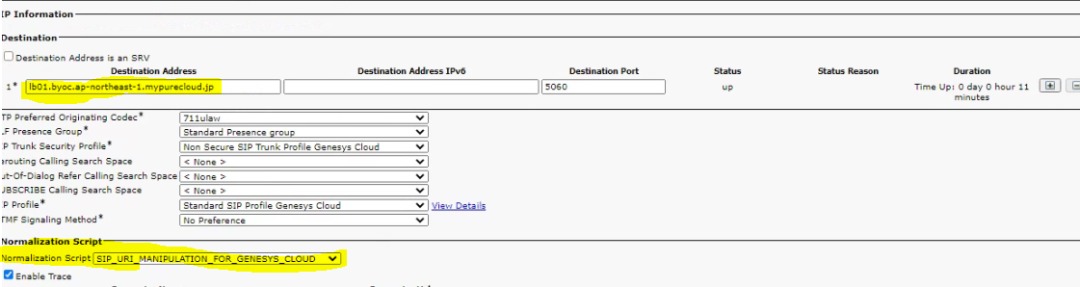
Understanding CUCM SIP Trunk ‘No Service’ Error
When setting up a SIP trunk in Cisco Unified Communications Manager (CUCM), encountering a ‘No Service’ status can be frustrating and disruptive to your communication system. This error indicates that the SIP trunk is not functioning as expected, preventing communication with external networks or endpoints.
There are several common reasons why you may see the ‘No Service’ error on your CUCM SIP trunk:
- Incorrect Configuration: Double-check the settings of your SIP trunk configuration, including IP addresses, ports, authentication details, and routing rules. Any errors or mismatched information can lead to the ‘No Service’ status.
- Network Connectivity Issues: Ensure that there are no network issues affecting the connection between CUCM and the SIP provider. Check for firewall restrictions, routing problems, or network congestion that may be blocking communication.
- SIP Provider Configuration: Verify that the SIP provider’s configuration matches the requirements set in CUCM. Incompatibilities in protocols, codecs, or security settings can cause the ‘No Service’ error.
- Security Settings: Review the security settings on both ends of the SIP trunk to ensure that they are compatible and allow for secure communication. Misconfigured security parameters can trigger the ‘No Service’ status.
To troubleshoot and resolve the ‘No Service’ error on your CUCM SIP trunk, consider the following steps:
- Review Configuration: Compare the settings in your CUCM with those provided by your SIP provider to identify any discrepancies.
- Test Connectivity: Use network diagnostic tools to check for connectivity issues between CUCM and the SIP provider’s server. Verify that traffic is allowed through firewalls and routers.
- Contact Support: If you are unable to resolve the issue independently, reach out to your SIP provider or Cisco support for assistance. They can offer guidance specific to your setup and help troubleshoot complex issues.
By addressing configuration errors, resolving network connectivity issues, ensuring compatibility with your SIP provider’s settings, and maintaining secure communication protocols, you can overcome the ‘No Service’ error on your CUCM SIP trunk and restore seamless communication within your organisation.
Benefits of CUCM SIP Trunk ‘No Service’ Alerts: From Error Identification to Enhanced Understanding
- Identifies configuration errors in SIP trunk settings
- Prompts troubleshooting of network connectivity issues
- Highlights discrepancies in SIP provider configuration
- Raises awareness of security setting misconfigurations
- Encourages collaboration with support for resolution
- Leads to enhanced understanding of SIP trunk functionality
Challenges of CUCM SIP Trunk Service Disruptions: Communication, Connectivity, and Operational Impact
- Disruption to external communication networks
- Loss of connectivity with SIP endpoints
- Impact on business operations and productivity
- Difficulty in diagnosing and resolving the root cause
Identifies configuration errors in SIP trunk settings
One key advantage of encountering the ‘No Service’ error on a CUCM SIP trunk is that it serves as a valuable indicator of potential configuration errors within the SIP trunk settings. By flagging these discrepancies, the error prompts administrators to review and rectify any misconfigurations, ensuring that the SIP trunk operates optimally and facilitates seamless communication. This proactive identification of configuration errors not only helps in troubleshooting the immediate issue but also enhances the overall reliability and efficiency of the communication system in the long run.
Prompts troubleshooting of network connectivity issues
Encountering the ‘No Service’ status on a CUCM SIP trunk prompts troubleshooting of network connectivity issues, which can lead to a more robust and reliable communication infrastructure. By investigating potential network issues such as firewall restrictions, routing problems, or network congestion, organisations can identify and address underlying connectivity challenges that may be hindering communication with external networks or endpoints. This proactive approach not only helps resolve the immediate ‘No Service’ error but also enhances the overall network performance and ensures seamless connectivity for future communication needs.
Highlights discrepancies in SIP provider configuration
One advantage of encountering the ‘No Service’ error on a CUCM SIP trunk is that it highlights discrepancies in the SIP provider configuration. When this error occurs, it prompts administrators to review and compare the settings between their CUCM system and the SIP provider’s configuration. By identifying and addressing any mismatched information or incompatible settings, organisations can ensure that their communication system is optimally configured for seamless connectivity and reliable communication with external networks or endpoints. This process of troubleshooting can lead to a more robust and accurate setup, ultimately enhancing the overall performance of the SIP trunk connection.
Raises awareness of security setting misconfigurations
Encountering the ‘No Service’ error on a CUCM SIP trunk can serve as a valuable alert that raises awareness of potential security setting misconfigurations. This pro highlights the importance of ensuring that security parameters are correctly configured to establish secure communication channels. By identifying and addressing these misconfigurations promptly, organisations can enhance their overall cybersecurity posture and mitigate potential vulnerabilities that could compromise the integrity of their communication systems.
Encourages collaboration with support for resolution
One significant advantage of encountering the ‘No Service’ error on a Cisco Unified Communications Manager (CUCM) SIP trunk is that it encourages collaboration and support for resolution. When faced with this issue, teams are prompted to work together to identify and address the root cause of the problem. By seeking support from SIP providers, network administrators, and possibly Cisco technical support, organisations can leverage collective expertise to troubleshoot and resolve the ‘No Service’ status efficiently. This collaborative approach not only fosters teamwork but also enhances communication between different stakeholders, leading to a more robust and resilient communication infrastructure in the long run.
Leads to enhanced understanding of SIP trunk functionality
Encountering the ‘No Service’ error in a CUCM SIP trunk can lead to an enhanced understanding of SIP trunk functionality. By troubleshooting and resolving this issue, users gain valuable insights into the configuration, network connectivity, and security aspects of SIP trunks. This hands-on experience not only improves technical proficiency but also deepens comprehension of how SIP trunks operate within the communication infrastructure. Ultimately, overcoming the ‘No Service’ error can empower users to optimise their SIP trunk setup for better performance and reliability in the future.
Disruption to external communication networks
Encountering the ‘No Service’ error on a CUCM SIP trunk can lead to a significant con, namely disruption to external communication networks. When the SIP trunk fails to establish a connection or encounters errors, it hampers the ability of organisations to communicate effectively with external parties, such as clients, partners, or suppliers. This disruption can result in missed opportunities, delayed responses, and overall inefficiencies in conducting business transactions that rely on seamless external communication channels. Addressing and resolving the ‘No Service’ issue promptly is crucial to minimising the impact on external communication networks and maintaining operational continuity.
Loss of connectivity with SIP endpoints
One significant drawback of encountering the ‘No Service’ error on a Cisco Unified Communications Manager (CUCM) SIP trunk is the loss of connectivity with SIP endpoints. When the SIP trunk fails to establish a service status, it disrupts the communication flow between CUCM and external SIP endpoints, such as VoIP phones or other devices. This loss of connectivity can result in communication breakdowns, inability to make or receive calls, and overall inefficiencies in business operations that rely on seamless communication channels. Resolving the ‘No Service’ error promptly is essential to restore connectivity with SIP endpoints and ensure uninterrupted communication within the network.
Impact on business operations and productivity
The ‘No Service’ error on a CUCM SIP trunk can have a significant impact on business operations and productivity. Communication is a vital aspect of any organisation, and when the SIP trunk fails to establish a connection, it can disrupt internal and external communication channels. This disruption can lead to delays in decision-making, hinder collaboration among team members, and impede customer interactions. Ultimately, the inability to communicate effectively can hamper productivity levels and potentially result in missed opportunities or dissatisfied clients. Resolving the ‘No Service’ issue promptly is crucial to minimising the negative impact on business operations and ensuring that workflows remain efficient and seamless.
Difficulty in diagnosing and resolving the root cause
One significant drawback of encountering the ‘No Service’ error on a CUCM SIP trunk is the difficulty in diagnosing and resolving the root cause of the issue. Due to the complex nature of communication systems and the multitude of potential factors that can contribute to this error, pinpointing the exact source of the problem can be a challenging task. This lack of clarity can lead to delays in troubleshooting and resolution, impacting the overall efficiency and reliability of the communication network. Without a clear understanding of what is causing the ‘No Service’ status, IT teams may struggle to implement targeted solutions, prolonging downtime and disrupting critical communication processes within an organisation.
Tags: communication system, configuration errors, cucm sip trunk no service, firewall restrictions, network connectivity issues, network diagnostic tools, security settings, sip provider configuration, sip trunk settings, troubleshooting