
The Ins and Outs of CUCM Extension Mobility Configuration
Configuring Cisco Unified Communications Manager (CUCM) Extension Mobility can greatly enhance the flexibility and efficiency of your organisation’s communication system. By allowing users to log in to any Cisco IP phone and have their personal settings follow them, Extension Mobility simplifies the process of hot desking and enables seamless communication across different locations.
Key Steps for Configuring CUCM Extension Mobility:
- Enable Extension Mobility service in CUCM.
- Create device profiles for users, specifying their individual settings.
- Associate device profiles with user accounts in CUCM.
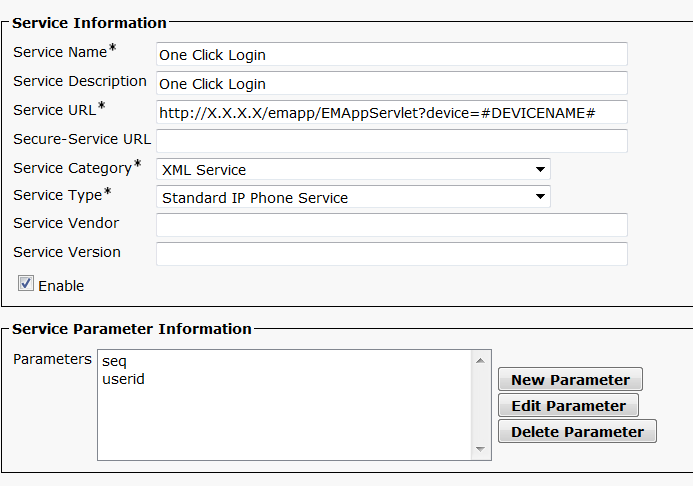
- Configure phone services to enable users to log in and out of phones using their credentials.
- Test the configuration by logging in and out of different phones to ensure that personal settings are applied correctly.
Benefits of CUCM Extension Mobility:
- Flexibility: Users can easily move between workstations without losing access to their personalised settings, such as speed dials, call history, and preferences.
- Efficiency: Hot desking becomes a breeze as employees can log in to any available phone and have their profile loaded instantly.
- Security: User credentials are required for logging in, ensuring that only authorised personnel can access specific phone features and settings.
- Simplicity: The user-friendly interface makes it easy for employees to log in and out of phones without requiring extensive training or technical knowledge.
In conclusion, implementing CUCM Extension Mobility is a valuable investment for organisations looking to optimise their communication infrastructure. By following the necessary configuration steps and leveraging the benefits of this feature, businesses can enhance productivity, streamline operations, and provide a seamless communication experience for employees.
8 Essential Tips for Configuring Extension Mobility in Cisco Unified Communications Manager (CUCM)
- Ensure that Extension Mobility service is activated on Cisco Unified Communications Manager (CUCM).
- Create device profiles for users who will be using Extension Mobility.
- Assign appropriate device profiles to users in CUCM.
- Configure phone button templates for devices using Extension Mobility.
- Set up the required softkey templates for Extension Mobility users.
- Adjust user permissions to control access to Extension Mobility features.
- Test the configuration by logging in and out of different phones using Extension Mobility.
- Regularly review and update Extension Mobility configurations as needed.
Ensure that Extension Mobility service is activated on Cisco Unified Communications Manager (CUCM).
To successfully configure Cisco Unified Communications Manager (CUCM) Extension Mobility, it is crucial to ensure that the Extension Mobility service is activated within the CUCM system. By activating this service, users will be able to seamlessly log in and out of different Cisco IP phones while retaining their personalised settings and preferences. This foundational step lays the groundwork for a smooth and efficient extension mobility configuration process, ultimately enhancing flexibility and user experience within the organisation’s communication network.
Create device profiles for users who will be using Extension Mobility.
Creating device profiles for users who will be utilising Extension Mobility in Cisco Unified Communications Manager (CUCM) is a crucial step in ensuring a seamless and personalised communication experience. By configuring individual device profiles that contain specific settings such as speed dials, ring tones, and display preferences, users can easily access their personalised communication environment regardless of the physical phone they are using. This not only enhances user convenience and flexibility but also streamlines the process of hot desking and promotes efficient communication workflows within the organisation.
Assign appropriate device profiles to users in CUCM.
Assigning appropriate device profiles to users in Cisco Unified Communications Manager (CUCM) is a crucial step in Extension Mobility configuration. By linking each user with a specific device profile that contains their personalised settings and preferences, organisations can ensure a seamless and consistent communication experience across different endpoints. This tailored approach not only enhances user satisfaction but also streamlines the process of hot desking, allowing employees to access their familiar settings no matter where they log in. Additionally, assigning the right device profiles to users helps maintain security by ensuring that individuals have access only to the features and functionalities relevant to their role within the organisation.
Configure phone button templates for devices using Extension Mobility.
When setting up Cisco Unified Communications Manager (CUCM) Extension Mobility, a crucial tip is to configure phone button templates for devices that will be utilising this feature. By defining specific button layouts and functions within these templates, administrators can ensure that users have access to the necessary features and functionalities when they log in to different phones. This proactive approach not only streamlines the user experience but also helps maintain consistency across devices, ultimately enhancing productivity and user satisfaction within the organisation’s communication system.
Set up the required softkey templates for Extension Mobility users.
When configuring Cisco Unified Communications Manager (CUCM) Extension Mobility, it is essential to set up the required softkey templates for Extension Mobility users. Softkey templates define the layout and functionality of the softkeys displayed on Cisco IP phones, allowing users to access specific features and functions easily. By customising softkey templates for Extension Mobility users, organisations can ensure that users have quick access to essential call handling options, such as transfer, conference, hold, and more, regardless of the phone they log in to. This proactive approach enhances user experience, promotes efficiency in communication workflows, and maximises the benefits of CUCM Extension Mobility across the organisation.
Adjust user permissions to control access to Extension Mobility features.
To enhance security and control within your Cisco Unified Communications Manager (CUCM) environment, it is crucial to adjust user permissions to manage access to Extension Mobility features effectively. By assigning specific permissions to users based on their roles and responsibilities, administrators can ensure that only authorised individuals have the ability to log in and out of phones using Extension Mobility. This level of control not only safeguards sensitive communication settings but also helps maintain the integrity of the overall system by preventing unauthorised access and misuse of Extension Mobility features.
Test the configuration by logging in and out of different phones using Extension Mobility.
To ensure the seamless functionality of your CUCM Extension Mobility configuration, it is crucial to test the setup by logging in and out of different phones using the Extension Mobility feature. By conducting this test, you can verify that individual user settings, such as speed dials, call history, and preferences, are correctly applied across various devices. Testing the configuration in real-world scenarios helps identify any potential issues and ensures that users can effortlessly access their personalised profiles regardless of the phone they are using. This step is essential for guaranteeing a smooth and efficient user experience within your organisation’s communication system.
Regularly review and update Extension Mobility configurations as needed.
It is essential to regularly review and update Extension Mobility configurations in Cisco Unified Communications Manager (CUCM) to ensure that the system remains efficient and tailored to the evolving needs of your organisation. By periodically assessing user profiles, device settings, and access controls, you can identify any changes or improvements required to enhance the functionality and security of your communication network. This proactive approach helps maintain a seamless experience for users and maximises the benefits of CUCM Extension Mobility across your business operations.
Tags: benefits, cisco unified communications manager, configuration, credentials, cucm extension mobility, cucm extension mobility configuration, device profiles, efficiency, flexibility, hot desking, phone services, security, service, simplicity, user-friendly interface, users